Disclosure: We may earn a commission from links on this page. Learn more.
Bandizip Review 2026: Is This Archiver the Best File Compression Tool?

Bandizip Review 2026 helps you decide if this archiver is the right tool before you trust it with big backups, work files, or shared downloads.
The real risk isn’t compression itself. It’s using an outdated or cluttered archiver that feels slow, confusing, and easy to misuse when you unpack files from the web.
In this guide, we’ll test Bandizip’s speed, format support, interface, and security options, then sum up the pros and cons so you can pick a tool that stays fast and reliable in 2026.
Bandizip Review: What Bandizip Is and Who It’s For
What is Bandizip?
Bandizip is a fast, user-friendly file compression tool for Windows (and there’s a separate Bandizip app for macOS). It can create and extract many archive formats like ZIP, 7Z, TAR, and ISO, making it a practical daily archiver for most users.
Bandizip distinguishes itself by providing high-speed compression and extraction capabilities, coupled with encryption functionalities. With its user-friendly interface and robust performance, Bandizip is designed to streamline file archiving tasks efficiently.
Key Features of Bandizip
Bandizip offers multiple features, including multi-core processing for faster compression and decompression, support for various compression levels, and the ability to create and extract multiple archives simultaneously.
The software allows you to compress files and folders into zip files or other formats with password protection for enhanced security. Its integration with Windows Explorer via the explorer context menu enables quick access to archiving functions, providing a seamless file management experience.
User Interface and Experience
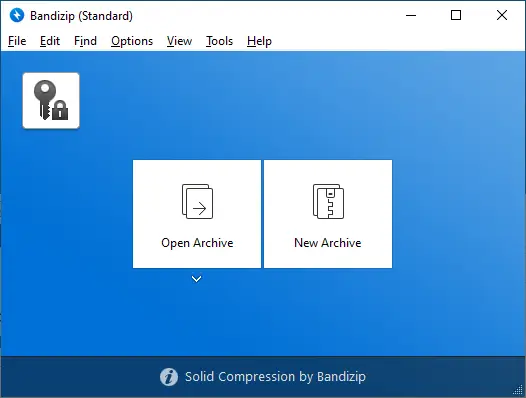
Bandizip provides a user-friendly interface, making it easy to compress and extract files. The integration with Windows Explorer through the context menu simplifies file archiving tasks, while advanced features are readily accessible for more experienced users.
The software’s design focuses on efficiency, allowing users to quickly compress, extract, and manage their files and archives. Overall, Bandizip balances functionality with ease of use.
File Compression Capabilities
Supported File Types
Bandizip offers broad compatibility with various file formats, making it a versatile archiver. It supports popular archive formats such as zip, rar, 7z, tar, and iso.
The ability to extract files from numerous file types ensures users can handle almost any archive they encounter. Bandizip also supports less common formats like lzh, arj, and img, further expanding its utility as a powerful archiver.
Compression Algorithms Used
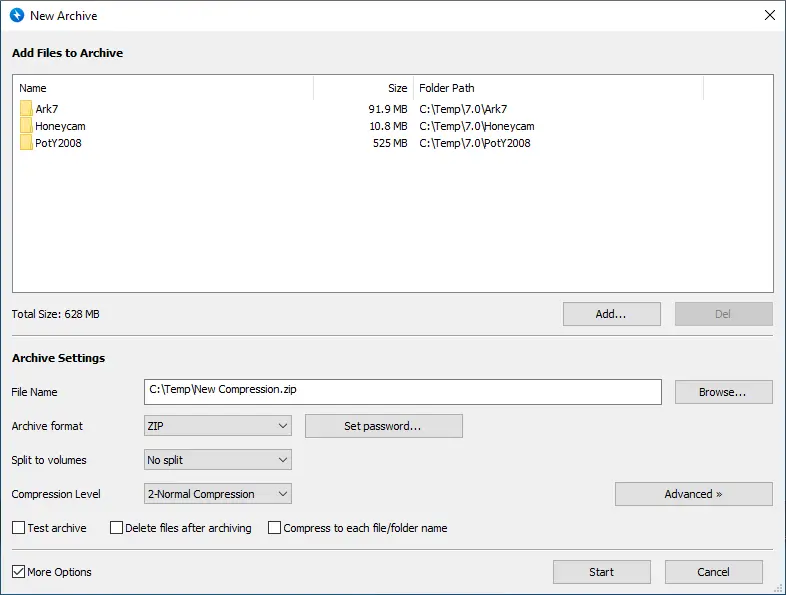
Bandizip employs several compression algorithms to achieve optimal compression ratio and speed. It supports standard algorithms like Deflate for zip files and LZMA for 7z archives.
Bandizip also uses multi-core processing to enhance compression and decompression speeds, ensuring efficient file archiving. The choice of algorithm can be tailored based on the specific archive format and desired balance between compression levels and processing time.
Performance and Speed Comparison
Compared to other compression tools like WinRAR, 7-Zip, PeaZip, WinZip and Ashampoo ZIP, Bandizip delivers competitive performance in terms of compression and decompression speed. Its multi-core processing capabilities significantly reduce the time required to compress files and extract files, especially for large archives. The high-speed compression offered by Bandizip makes it a practical choice for users seeking efficiency without compromising compression quality.
Security Features
Password Protection
Bandizip offers robust password protection to secure archive files. Users can encrypt their zip files and other archive formats with strong passwords, preventing unauthorized access to sensitive data. This feature is crucial for ensuring the confidentiality of files and folders.
Bandizip’s compression and encryption features work well for personal use, and Bandisoft’s license policy allows using the Standard Edition in business environments too (paid editions mainly add advanced features and higher limits).
Malware Protection Measures
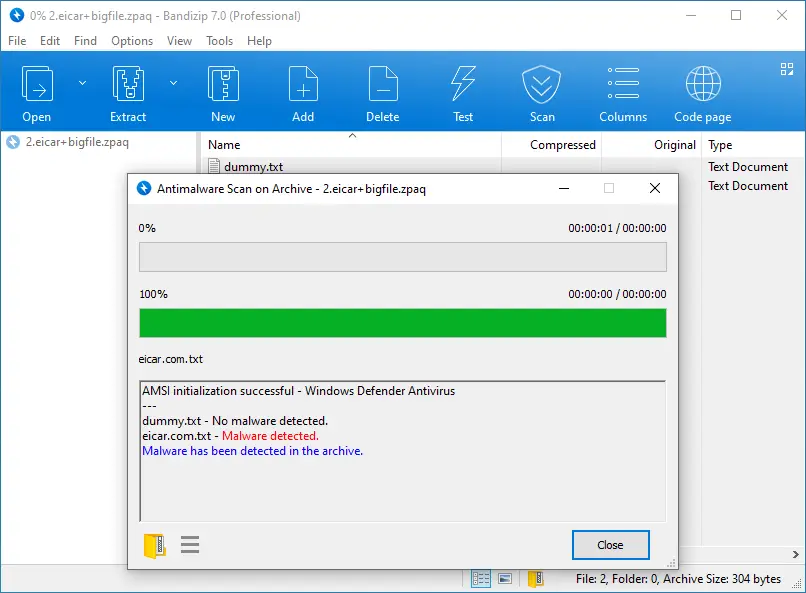
Bandizip can scan archives for malware on Windows using Microsoft’s AMSI (so your installed security app can inspect archive contents before extraction). This helps reduce risk when unpacking downloaded ZIP/RAR files, but it’s not a replacement for real-time antivirus protection.
For best protection, keep your real-time antivirus enabled and avoid extracting unknown archives from random sites or email attachments. Use Bandizip’s malware scan option where available, then extract to a safe folder and open files carefully.
Integration with Password Managers
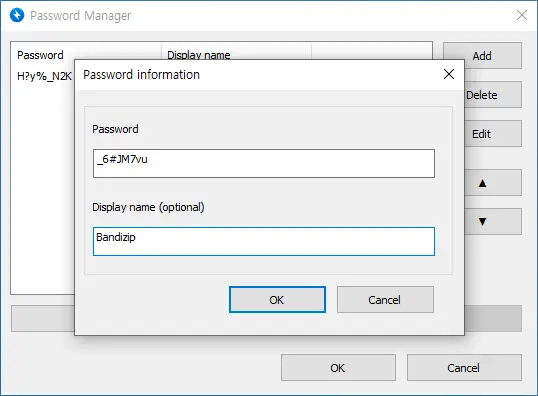
Bandizip does not have direct integration with password managers. However, users can still employ password managers to generate and store strong, unique passwords for their archive files.
By copying and pasting passwords from a password manager when creating archives, users can ensure that their files are protected by robust, hard-to-guess passwords. This approach enhances the security of archive files created with Bandizip.
Pros and Cons of Bandizip
Advantages of Using Bandizip
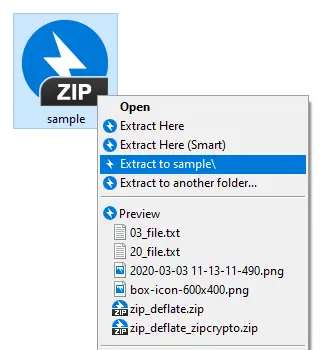
Bandizip offers multiple advantages as a file archiving and compression tool. Its user-friendly interface and integration with Windows Explorer via the context menu make it exceptionally easy to compress files and extract files. The software supports multiple file formats, including zip, rar, 7z, tar, and iso, ensuring compatibility with most archives.
The multi-core processing accelerates both compression and decompression, improving efficiency for both personal and commercial use. Bandizip’s high-speed compression and broad format support position it as a strong contender among archivers.
Limitations and Drawbacks
Despite its strengths, Bandizip has some limitations. It lacks some advanced features found in other compression tools like WinRAR and 7-Zip. While it supports password protection, it does not offer direct integration with password managers, requiring users to manage passwords manually.
Malware scanning support depends on Windows (AMSI) and your installed security software, so results can vary by setup. Treat it as an extra safety layer, not a guarantee—good download habits and real-time protection still matter.
Comparison with Other Free Compressors
When comparing Bandizip with other free file archivers like 7-Zip, PeaZip, WinZip and Ashampoo ZIP, several differences emerge. 7-Zip is open-source and known for its high compression ratio and strong compression and encryption capabilities.
PeaZip offers a wide range of features and file type support, but its interface can be less intuitive. Bandizip balances user-friendliness with performance, making it a solid choice for those who need an efficient and easy-to-use compression tool.
Conclusion: Is Bandizip the Best Free File Archiver?
Bandizip is a fast, user-friendly free file archiver that supports many formats including ZIP and RAR, offering efficient compression and extraction for both novices and experienced users. Its clean interface and high-speed performance make it a practical choice for everyday file archiving. While it lacks some advanced premium features, its balance of speed and ease of use stands out.
It’s ideal for users who need a straightforward tool for frequent compression and extraction, with useful features like Windows Explorer context menu integration. Bandizip emphasizes simplicity and speed over complex configuration, so tasks are quick and accessible. This makes it suitable for individuals and businesses seeking reliable, no-frills archiving.
Evaluate your needs: choose WinRAR or 7-Zip if you need granular compression control or advanced integrations. If speed, simplicity, and broad format support are priorities, Bandizip is an excellent option. Always use strong passwords for encrypted archives and scan files for malware before compressing or extracting.
Further Reading
Want to compare Bandizip with other fast, modern archivers? Check out these helpful posts:
- Best File Compression Software (2026 guide)
- 7z vs ZIP vs RAR: Choose the Right File Compression Format
- 7-Zip Review
- Is WinRAR Safe to Use?
- WinZip Review
- Is PeaZip Safe? (Review)
- Wondershare PDFelement Review 2026
For more helpful guides, visit our Software & Apps category.
FAQs
Is Bandizip free for personal use?
Yes, Bandizip is free for personal use and provides a robust compression engine with essential free features plus optional paid upgrades for advanced functions and professional support options for users.
Can Bandizip decompress rar files and other formats?
Bandizip can decompress RAR, TGZ, TBZ, LHA, BZ and many additional archive formats quickly and reliably, offering broad compatibility for extracting common and less common compressed files across workflows.
How do I extract a zip archive to a specific directory?
Right-click the archive and choose the extract option to specify the destination directory; Bandizip preserves folder structures, supports Unicode names, and enables easy selection of extraction paths.
Does Bandizip support NTFS permissions and UDF volumes?
Bandizip can extract files from NTFS and common file systems and handles typical metadata, but it may not preserve all advanced NTFS permissions or specialized UDF metadata in every scenario.
Can I disable the installer MSI and use a portable extractor?
Yes. Bandizip offers a portable option for Windows in addition to the normal installer, which is useful for restricted PCs or quick troubleshooting. Just remember: portable use doesn’t change security—only download from the official source and keep your system protection on.
Is Bandizip cross-platform or Windows-only?
Bandizip is available for Windows, and there’s also a separate Bandizip product for macOS (sold via the Mac App Store). Features and licensing can differ between Windows and macOS editions, so treat them as two distinct apps under the same brand.
Will Bandizip delete files after compressing or extract safely?
Bandizip does not delete original files by default; extraction and compression are safe operations unless you explicitly enable a delete option or run additional cleanup actions manually afterwards.
How does Bandizip handle long or Unicode file names?
Bandizip fully supports Unicode and long file names, preserving international characters and deep directory paths during compression and extraction to avoid corruption of multilingual filenames.
Does Bandizip use a lot of system resources for powerful compression?
Bandizip is optimized for efficiency; higher compression levels use more CPU cycles but generally maintain low memory usage and minimal impact on overall system responsiveness during operations.
Is Bandizip one recommended as a fast extractor for large TBZ or TGZ files?
Yes, Bandizip is commonly recommended as a fast extractor for large TBZ, TGZ and other compressed archive types, combining speed, stability, and broad format support for heavy-duty tasks.