Disclosure: We may earn a commission from links on this page. Learn more.
Best AI Video Generators in 2026: Compare the Top AI Video Creation Tools

An AI video generator is a tool that uses generative AI to create videos from a text prompt, script, or template. Instead of recording everything manually, these tools can generate visuals, voice, avatars, and short video scenes inside one workflow.
Most AI video generators in 2026 are not built for the same purpose. Some focus on avatar-led business videos, some are better for social media content, and others are designed for creative prompt-based video generation. That is why tools like Synthesia, HeyGen, Vidnoz, Kling AI, and Luma Dream Machine can feel very different in real use.
The biggest advantage is speed. A creator can start with a script, choose a template or style, and produce video content much faster than with a traditional video production workflow. These tools are now useful for marketers, educators, creators, and small teams that need faster output.
The best AI video generators in 2026 depend on your goal. Synthesia and HeyGen are strong for avatar-led business and marketing videos, while VEED AI, InVideo AI, Luma Dream Machine, and Kling AI fit editing-heavy or prompt-based creative workflows better.
What AI Video Generators Are and How They Work
What an AI Video Generator Does
An AI video generator creates video content automatically using generative AI models. Instead of recording footage and editing clips manually, the platform generates scenes, avatars, voiceovers, and visual frames based on a script or text prompt.
Most AI video generators in 2026 help creators produce video content faster by combining video generation, AI voice, templates, and simple editing tools. Platforms like Synthesia, HeyGen, Vidnoz, Kling AI, and Luma Dream Machine are commonly used to create training videos, YouTube content, and social media videos without a traditional filming setup.
Typical AI Video Creation Workflow
Most AI video tools follow a simple workflow that converts a script or text prompt into a finished video. The creator starts by adding a script, choosing a template or AI avatar, and selecting voice or style options inside the platform.
The system then generates video scenes automatically, combining visuals, narration, and frames into a complete video output. Many tools allow small edits before exporting, such as replacing clips, adjusting text, or improving video quality for different social media platforms.
How Prompts, Scripts, and Templates Shape the Output
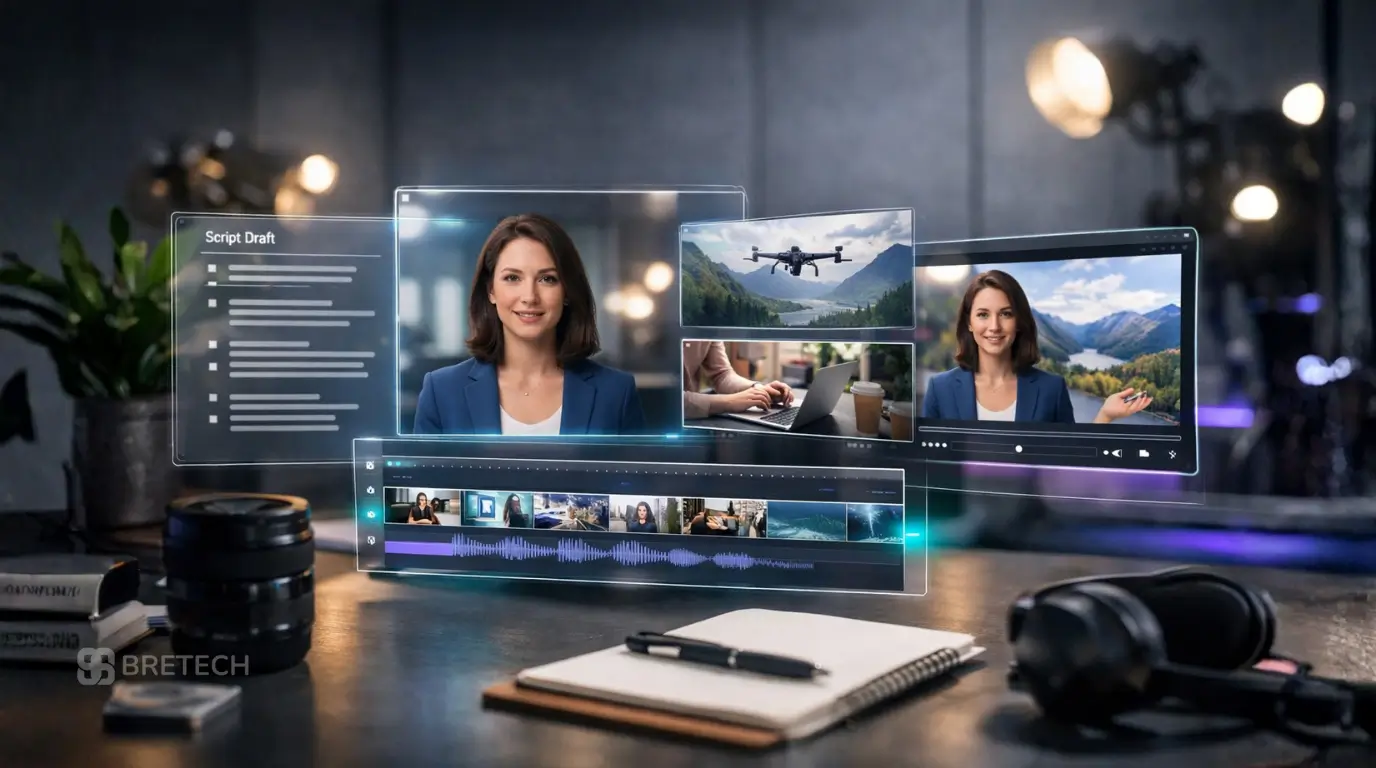
The quality of AI video generation depends heavily on the script or text prompt used during creation. Clear prompts help the AI model understand the context, which improves scene generation, voice timing, and the overall flow of the video.
Templates also affect the final result. Many AI video platforms offer templates for marketing videos, training videos, YouTube explainers, and short social media clips, allowing creators to produce professional video content quickly while keeping a consistent workflow.
AI Video Generators Comparison Table
Choosing the best AI video generator depends on what type of video you want to create. Some tools specialize in AI avatar videos, while others focus on text-to-video generation, marketing content, or fast script-to-video workflows.
The table below compares several AI video generators in 2026 based on their main strengths and typical use cases so creators can quickly identify which tool fits their video production needs.
| AI Video Generator | Best For | Key AI Features |
|---|---|---|
| Vidnoz AI | Avatar and talking videos | AI avatar presenter, script-to-video workflow, templates, AI voiceover |
| Synthesia | Training videos and business content | Professional AI avatars, multilingual voice, structured training video templates |
| HeyGen | Marketing and presenter videos | AI avatar videos, marketing templates, voice and prompt-based video creation |
| Luma Dream Machine | Creative visual clips | Advanced AI video model, cinematic visual generation from prompts |
| Kling AI | Experimental AI video generation | Generative video model capable of producing short clips from prompts |
| VEED AI | Social media video editing | AI video editor tools, subtitles, quick editing workflow |
| InVideo AI | Script-to-video creation | Template-based workflow, automated scene generation |
| Pictory | Turning content into short videos | Converts long content into social media clips and video summaries |
Related Reviews and Guides
- Vidnoz AI Review
- Best Video Editing Software Deals
- WonderFox Video Converter Review
- HitPaw Video Converter Review
Types of AI Video Generators in 2026
Text-to-Video AI Generators
Text-to-video AI generators create video clips directly from a text prompt or script. These tools rely on advanced AI video models that generate scenes frame by frame based on the description provided by the user.
Platforms such as Kling AI and Luma Dream Machine focus on prompt-led visual generation, while broader model releases such as Google’s Veo 3.1 and OpenAI’s Sora 2 show how fast the high-end side of the market is moving. For this blog, it is better to keep the main comparison centered on creator tools people can access directly, not only foundation models.
AI Avatar Video Generators
AI avatar video generators create videos where a digital presenter reads a script on screen. These platforms are popular for training videos, tutorials, marketing content, and YouTube explainers because they simulate a talking presenter without recording a real person.
Tools such as Synthesia, HeyGen, and Vidnoz allow creators to select an avatar, add a script, and generate a professional video with synchronized AI voiceover. This workflow is widely used by businesses that need scalable video production for internal training or product demonstrations.
AI Video Editors and Template-Based Tools
Some platforms focus less on full generative video and more on AI-assisted video editing. These tools help creators assemble videos quickly using templates, automated subtitles, and built-in editing features.
Tools like VEED AI and InVideo AI fall into this category. They provide a structured video creation workflow where creators start with a script or template, generate scenes automatically, and then refine the final video output using editing tools designed for social media platforms and marketing content.
Best AI Video Generators of 2026
1. Vidnoz AI: Best for Avatar and Talking Videos
Vidnoz AI is widely used for creating AI avatar videos where a digital presenter speaks directly from a script. The platform includes templates, AI voiceover, and a simple workflow that helps creators generate training videos, tutorials, and social media content quickly without recording a real presenter.
2. Synthesia: Best for Training Videos and Business Content
Synthesia is one of the most recognized AI video generators for professional training videos and business communication. It allows teams to create structured videos with AI avatars, multilingual voice options, and clear templates that work well for tutorials, onboarding content, and internal training videos.
3. HeyGen: Best for Marketing and Presenter-Style Videos
HeyGen focuses on marketing and presenter-style videos with avatars, and its current workflow supports text, image, or audio inputs before generating narrated videos. That makes it a better fit for product explainers, ads, and polished talking-head content than for experimental cinematic clips.
4. Luma Dream Machine: Best for Creative Visual Clips
Luma Dream Machine is designed for creative AI video generation using advanced video models that generate visual scenes from prompts. It is often used by creators who want cinematic clips, experimental visuals, or short creative videos generated directly from a text prompt.
5. Kling AI: Best for Experimental AI Video Generation
Kling AI is an emerging AI video model focused on generative video creation from prompts. It can generate dynamic video clips and visual scenes, making it popular among creators exploring new forms of AI-driven video production.
6. VEED AI: Best for Social Media Content
VEED AI is now more than a simple subtitle tool. It works as an end-to-end video platform with talking-head creation, AI editing, dubbing, and subtitles, which makes it a practical choice for social content and light presenter-style workflows.
7. InVideo AI: Best for Fast Script-to-Video Workflows
InVideo AI is best for fast script-to-video work because it can turn prompts into scripts, clips, subtitles, music, and voiceovers in a browser-based workflow. It is especially useful for creators who care more about speed and volume than fine scene-level control.
8. Pictory: Best for Turning Content into Short Videos
Pictory is strongest when you want to repurpose written content. Its current tools support prompt-to-video, text/script-to-video, and URL/article-to-video workflows, which is why it still fits blog-to-video summaries, short clips, and content repurposing.
Best for Social Media Videos
For social media videos, VEED AI and Pictory are strong choices because they support fast editing, captions, short clips, and platform-friendly video output. These tools work well for creators who need quick content for YouTube Shorts, TikTok, and other social media platforms without a heavy editing workflow.
Best for Training Videos
For training videos, Synthesia stands out because it is built for structured business content with AI avatars, multilingual voice options, and professional templates. It is especially useful for onboarding, internal training, tutorials, and explainers where clear delivery matters more than cinematic visuals.
Best for Content Creators
For content creators, HeyGen, Vidnoz AI, and VEED AI are practical options because they balance speed, templates, and creator-focused workflows. These tools help creators produce talking videos, marketing clips, and social media content without needing a full traditional video production setup.
Best for Script-to-Video Workflows
For script-to-video workflows, InVideo AI is one of the most suitable tools because it can turn written content into structured video scenes quickly. This makes it useful for creators, marketers, and small teams that want to generate video content directly from a script or prompt with less manual work.
Best for Simple Video Editing
For simple video editing, VEED AI is a strong choice because it combines AI-assisted editing, subtitles, templates, and quick export options in one platform. It is a practical tool for users who want to improve video quality, trim clips, and prepare content for social media without learning advanced video editor software.
Best for Creative Video Production
For creative video production, Luma Dream Machine and Kling AI are better fits because they focus on visual AI video generation from prompts instead of presenter-style templates. These tools are more useful for creators experimenting with cinematic clips, visual storytelling, and new forms of generative video.
Key Features to Look for in an AI Video Generator
Avatar Quality and Voice Options
One of the most important features in an AI video generator is the quality of the AI avatar and voice output. Platforms like Synthesia, HeyGen, and Vidnoz provide realistic avatars that can deliver scripts clearly, making them useful for training videos, explainers, and business presentations.
Voice options also matter. Good AI video tools provide multiple voice styles, language support, and natural speech timing. Clear voice output improves the overall video quality and makes the content more suitable for professional video production and social media platforms.
Script Handling and Prompt Control
Strong script handling is essential for efficient AI video creation. Many platforms allow creators to paste a script, break it into scenes, and control how the AI model generates visuals and narration.
Some tools also support text prompt control, which helps creators influence how scenes appear or how clips are generated. Better prompt control allows users to refine video generation and create more accurate video content.
Templates, Editing Tools, and Workflow Speed
Templates and built-in AI video editor tools can significantly speed up video creation. Platforms such as VEED AI and InVideo AI offer ready-made templates for marketing videos, training content, and social media videos.
These templates simplify the video creation workflow by automatically structuring scenes, captions, and transitions. This allows creators to generate video output faster without spending time on complex manual editing.
Export Quality and Video Production Flexibility
Export options determine how useful the final video output will be. A good AI video platform should allow users to export videos in different resolutions suitable for YouTube, social media content, or professional video production.
Flexibility is also important. Some tools allow creators to edit scenes, replace clips, and adjust timing before export, which helps improve video quality and ensures the final video fits the intended platform or audience.
Common Limits and Trade-Offs to Know Before You Choose
Before publishing client or branded work, also check commercial-use terms, avatar consent rules, and voice-cloning permissions for the specific tool you choose.
Free Plan Limits and Watermarks
Many AI video generators offer a free plan or free trial, but these versions often come with limits that affect real use. Common restrictions include low export quality, shorter video length, limited avatars or templates, fewer AI credits, and watermarks on the final video output.
A free tier can still be useful for testing the workflow, avatar quality, and interface before paying for pricing plans. However, creators making client work, YouTube content, or professional video projects usually need a paid plan to remove watermarks and unlock better export options.
Editing Control vs Speed
One of the biggest trade-offs in AI video creation is speed versus control. Many tools can generate video quickly from a script or prompt, but faster workflows often give users less control over scene timing, frame selection, and detailed editing.
This is why template-based tools are often easier for beginners, while creators who want more creative freedom may prefer platforms with stronger editing tools or more flexible prompt control. The best choice depends on whether speed or customization matters more for your workflow.
Where AI Video Tools Still Need Manual Work
Even strong AI video tools still need manual review. Scripts may need cleanup, AI voice may sound too flat in some scenes, and generated visuals may not always match the exact message or brand style.
Creators often still need to adjust text, replace clips, refine prompts, or improve video quality before publishing. AI can save time in video production, but it does not fully replace human judgment, especially for professional video content or client-facing work.
How to Choose the Best AI Video Generator for Your Needs
For Beginners
Beginners should choose an AI video generator with a simple interface, ready-made templates, and an easy script-to-video workflow. Tools like Vidnoz AI, VEED AI, or InVideo AI are often easier to learn because they reduce setup time and make video creation more direct.
A beginner-friendly tool should also offer a usable free plan, clear editing controls, and fast export options. The goal at this stage is not to find the most advanced AI video model, but the one that helps you create videos consistently without confusion.
For Creators and Small Teams
Creators and small teams usually need a balance of speed, flexibility, and output quality. Tools like HeyGen, VEED AI, and InVideo AI work well here because they support regular content production for YouTube, marketing, and social media platforms.
The best option depends on the content style. Teams making presenter videos may prefer AI avatar tools, while creators producing short clips or platform-specific content may need stronger editing tools and a faster workflow.
For Training, Tutorials, and Business Videos
For training videos, tutorials, and business communication, Synthesia is often one of the strongest choices because it focuses on structured presenter-led content. Its AI avatars, voice options, and business-ready templates make it suitable for onboarding, internal communication, and educational material.
In this use case, consistency matters more than flashy visual generation. A good tool should handle scripts clearly, keep voice delivery natural, and support repeatable video production across multiple lessons or training modules.
For Social Media Content and Short-Form Video
For social media content and short-form video, creators usually need fast editing, captions, templates, and export options designed for different platforms. VEED AI, Pictory, and InVideo AI are strong fits because they are built around quick workflows and short video output.
These tools are especially useful when you need to turn ideas, scripts, or longer content into clips for TikTok, YouTube Shorts, and other social media videos. In this category, speed, clarity, and platform-ready formatting usually matter more than advanced cinematic generation.
Final Verdict: Which AI Video Generator Is Best in 2026
The best AI video generator in 2026 depends on the kind of video you want to make. Some users need an AI video creator for structured scripts and avatars, while others want an AI video maker for fast clips and social media content.
For training and business videos, Synthesia is one of the strongest options because of its realistic avatars and clear script handling. HeyGen and Vidnoz are also good fits for presenter-style and faceless videos where speed and consistency matter.
For marketing and short-form content, VEED AI, InVideo AI, and Pictory are practical choices because they make it easier to turn ideas into short videos quickly. At the higher end, Google’s Veo 3.1 shows where AI video is heading, but most creators will get more everyday value from accessible tools that match their workflow.
Read Next
- Vidnoz AI Review
- Best Video Editing Software Deals
- HitPaw Video Converter Review
- AI Automation Tools for Content Creators
FAQs
Q: What is the best AI video generator or AI video creator in 2026?
The best AI video creator depends on the type of content you produce. Synthesia is strong for training videos, while HeyGen and Vidnoz are popular for avatar presentations. VEED AI and InVideo AI are useful for fast social media content.
Q: Which AI video generator is best for avatars and faceless videos?
Synthesia, HeyGen, and Vidnoz are among the leading AI video tools for avatar and faceless videos. These platforms turn a script into a talking presenter video without recording a real person.
Q: Which AI video maker is best for training videos?
Synthesia is often the best AI video maker for training videos because it provides structured templates, realistic avatars, and reliable script delivery suited to lessons, onboarding, and tutorials.
Q: Are AI video generators a good video platform for social media content?
Yes. Many AI tools work as a complete video platform for short content. Tools like VEED AI, InVideo AI, and Pictory help creators add text, captions, and scenes to generate a new video quickly.
Q: Is Veo an alternative to other AI video generators?
Veo is an advanced generative video model focused on creating high-end video scenes from prompts. It shows how AI video technology is evolving, but most creators still rely on practical tools for everyday video production.