Disclosure: We may earn a commission from links on this page. Learn more.
Best Routers for Smart Homes (2026): Top Wi-Fi Routers for Smart Devices
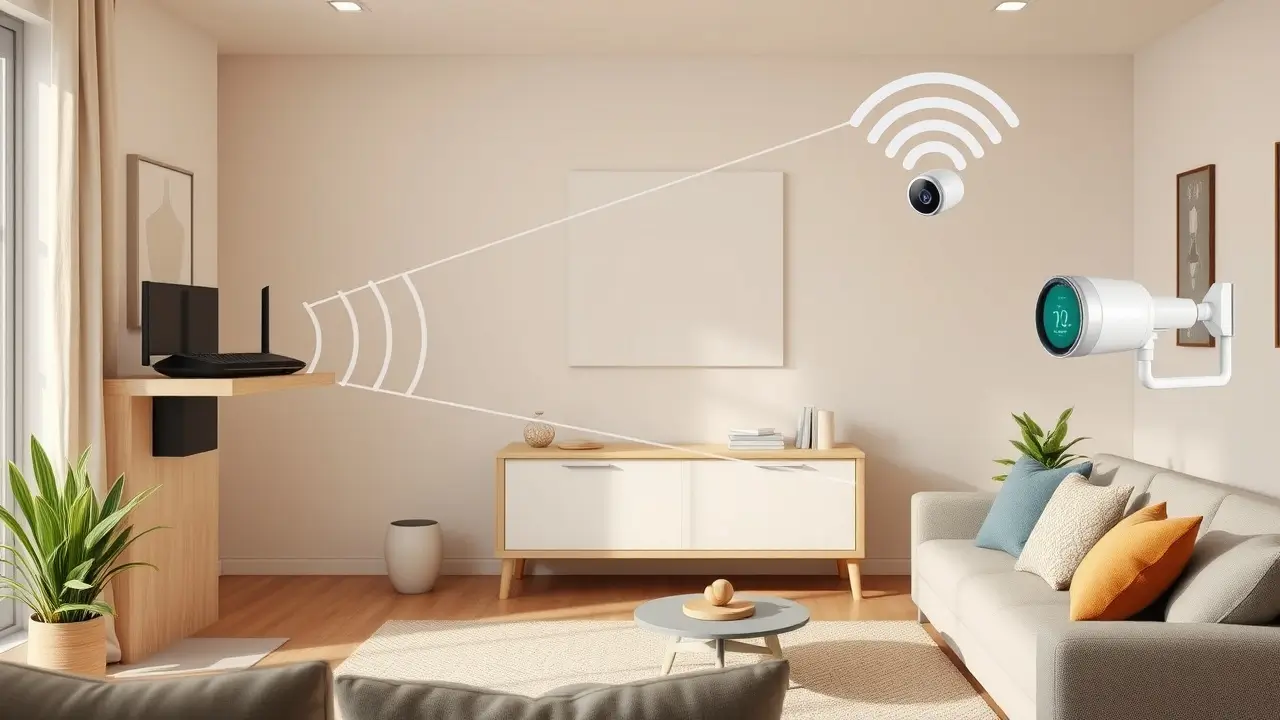
How to choose the best router for a smart home in 2026 starts with one simple rule: choose for stable coverage first, not just speed. When lights lag, cameras disconnect, or video calls buffer, the router is often the real cause.
A common mistake is buying a router based only on big speed claims or trendy labels. That can lead to weak coverage, poor performance with many connected devices, or paying extra for features your home may never use.
The better approach is to match the router to your home size, layout, device count, security needs, and budget. For many homes, Wi-Fi 6 still offers strong value, while Wi-Fi 7 makes more sense for larger or more demanding setups.
In this guide, you will learn how to choose between a single router and a mesh system, what matters most for smart home performance, and which mistakes to avoid before you buy.
The best router for a smart home is the one that gives you stable coverage, handles many connected devices, and fits your home layout. For small homes, a good Wi-Fi 6 or Wi-Fi 7 router is often enough. For larger homes, multi-floor layouts, or dead spots, a mesh system is usually the better choice.
At a Glance: Which Router Type Is Best for Your Smart Home?
| Router Type | Best For | Main Advantage | Possible Drawback |
|---|---|---|---|
| Single Wi-Fi Router | Small flats, apartments, smaller homes | Simple setup and lower cost | Coverage may drop in far rooms |
| Dual-Band Router | Basic smart homes with light use | Affordable and easy to manage | Less ideal for heavy traffic |
| Tri-Band Router | Homes with many devices, streaming, gaming | Better handling of busy networks | Usually costs more |
| Mesh Wi-Fi System | Large homes, multi-floor homes, dead spots | Better whole-home coverage | Higher upfront cost |
| Wi-Fi 6 Router | Most homes in 2026 | Good speed, efficiency, and value | Not as future-focused as Wi-Fi 7 |
| Wi-Fi 7 Router or Mesh | High-end smart homes, fast broadband, future upgrades | Better capacity, lower latency, newer features | Premium pricing |
If you already know you need stronger home Wi-Fi, start with our guide to the best Wi-Fi 6 routers for multiple smart devices or compare the best mesh Wi-Fi systems for smart homes for wider coverage.
Why a Good Router Matters in a Smart Home
A router is not just a box that brings internet into the house. In a smart home, it becomes the link between cameras, plugs, speakers, thermostats, TVs, phones, tablets, and voice assistants.
When the router is weak, the whole setup feels unreliable, especially when many smart devices depend on a stable wireless connection. One camera disconnects. A smart bulb responds late. A doorbell misses a notification. Streaming starts buffering when someone else joins a video call.
That is why choosing the right router matters more in a smart home than in a basic internet setup. Smart devices often stay connected all day, and even low-bandwidth devices can create network congestion when there are many of them.
Impact of Weak Wi-Fi on Smart Homes
Weak Wi-Fi causes more than slow browsing. It affects automation, security, and convenience.
A weak signal can make smart plugs disconnect, delay voice assistant commands, and reduce the reliability of smart cameras. In some homes, the issue is not internet speed at all. It is simply poor internal coverage from the router to the device.
This becomes even more noticeable when devices are spread across bedrooms, hallways, kitchens, garages, and outdoor spaces.
Common Problems Caused by the Wrong Router
A poor router choice usually shows up in familiar ways:
- Dead zones in some rooms
- Smart cameras dropping offline
- Video buffering during streaming
- Slow speeds when many devices connect
- Weak coverage on upper floors
- Poor parental controls or security options
- Setup that feels too technical for everyday users
A smart home should make life easier. The wrong router does the opposite.
Why Device Dropouts Are So Frustrating
Device dropouts are one of the most common smart home complaints. A light may stop responding in the app. A smart speaker may say it is offline. A security camera may reconnect too slowly after a brief interruption.
This is often a coverage or stability issue, not a device fault. A stronger router or a better mesh setup can solve the problem faster than replacing the smart device itself.
If your cameras, plugs, or speakers keep going offline, read our guide on how to stop smart home devices disconnecting from Wi-Fi before you replace your current setup.
Router vs Mesh: What Is Better for Smart Homes in 2026?
This is one of the biggest buying decisions for a smart home setup.
A normal router creates Wi-Fi from one main point. That works well in smaller homes where the signal can reach most rooms without much trouble.
A mesh system uses a main unit plus one or more extra nodes placed around the home. These nodes work together to spread the signal more evenly.
Still deciding between one router and a mesh system? See our practical comparison of ASUS RT-AX86U vs Eero Pro 6E: router or mesh? for a real-world look at both approaches.
When a Standard Router Is Enough
A standalone router is often enough when:
- You live in a small or medium-size flat
- Most devices stay close to the router
- You do not have major dead spots
- You want a simpler and cheaper setup
For many people, a good Wi-Fi 6 or Wi-Fi 7 router will be more than enough for everyday smart home use.
When Mesh Makes More Sense
A mesh system usually makes more sense when:
- Your home has multiple floors
- Thick walls weaken Wi-Fi
- The router cannot reach back rooms
- You have cameras or devices outdoors
- Many devices are spread across the house
Mesh is not always necessary, but it is often the better long-term choice when coverage matters more than saving money upfront.
The Main Advantage of Mesh
The best thing about mesh is consistency. Instead of trying to stretch a weak signal from one corner of the house, mesh spreads coverage more evenly.
That matters more in a smart home than many people realise. A strong, stable signal in every room is often more useful than chasing the highest speed number on the box.
Wi-Fi 6 vs Wi-Fi 7 for Smart Homes
Many buyers now wonder whether Wi-Fi 6 is still worth buying or whether Wi-Fi 7 is the better long-term option.
The answer depends on budget, broadband speed, and how demanding the home network is.
Why Wi-Fi 6 Is Still a Good Choice
Wi-Fi 6 remains a very good option for many homes in 2026. It offers good efficiency, improved handling of multiple devices, and strong real-world performance for normal streaming, browsing, video calls, and everyday smart home use.
If your internet plan is not extremely fast and your home is not huge, Wi-Fi 6 can still be the smart value choice.
Why Wi-Fi 7 Is Getting More Attention
Wi-Fi 7 is designed for faster speeds, lower latency, and better performance across busy modern networks.
That does not mean everyone needs Wi-Fi 7 today. But it does make more sense for:
- Large homes
- Multi-gig internet plans
- Heavy streaming and gaming
- Homes with many devices connected at once
- Buyers who want to keep the router longer before upgrading
Which One Should Most People Buy?
For many users, Wi-Fi 6 still offers the best balance of cost and performance.
Wi-Fi 7 is better for buyers who want stronger future-proofing, premium performance, and better support for heavy home networks. If the budget allows it, Wi-Fi 7 is the more future-ready upgrade.
What to Look for in a Smart Home Router
Not every router is built the same. The best choice depends on more than just brand or speed rating.
Device Capacity
Smart homes often have more connected devices than people first expect. It is not only phones and laptops. It is also cameras, locks, plugs, lights, TVs, speakers, consoles, and appliances.
That is why capacity matters. A router that performs well with many active devices will usually provide a smoother smart home experience.
Coverage
Coverage is one of the biggest factors in real-world satisfaction.
A powerful router may still struggle if the home layout is difficult. Thick walls, long hallways, upstairs rooms, and outdoor areas can all weaken the signal. A mesh system generally handles this better than a single router.
Band Support
Many smart home devices still rely on 2.4 GHz because it has longer range and works well for low-bandwidth devices.
At the same time, newer phones, laptops, and streaming devices benefit from 5 GHz or 6 GHz for better speed and lower congestion. A router that handles all of this well is better than one that only looks impressive on the product page.
Security Features
A router is part of your home security, not just your internet setup.
Look for support for:
- WPA3 security
- Automatic firmware updates
- Guest network options
- Separate IoT network or device isolation
- Good parental controls if needed
Ethernet Ports and Backhaul
If you have smart TVs, gaming consoles, or desktop PCs, wired ports still matter.
On mesh systems, wired backhaul can also improve stability between nodes. That can be very useful in larger homes where wireless backhaul is not ideal.
Which Router Type Fits Your Smart Home Setup?
Instead of chasing one perfect router for every home, it is better to match the router type to your layout, device count, and daily use. A small flat, a large multi-floor house, and a busy family home with streaming and gaming all need different strengths.
The best choice is usually the one that gives enough coverage, stable performance, and good long-term value. In many cases, that matters more than buying the newest or most expensive router on the shelf.
Best for Apartments and Small Homes
A strong single router is often enough for apartments and smaller homes. If most of your devices stay within a reasonable distance from the router, you may not need the extra cost or setup of a mesh system.
Look for:
- Reliable Wi-Fi 6 or Wi-Fi 7 performance
- Good security
- Stable coverage in a compact area
- Easy app setup
- Reasonable price
In smaller spaces, mesh may be unnecessary unless the layout creates unusual dead spots. A good standalone router is usually simpler to manage and can still handle smart speakers, cameras, TVs, phones, and everyday home automation devices without much trouble.
Best for Large Homes
Large homes usually benefit most from mesh. One router often struggles to keep a strong signal across multiple floors, long hallways, thick walls, or outdoor areas.
If the home has multiple floors, outdoor cameras, or smart devices spread across many rooms, a mesh system is normally the better long-term buy. It helps create more even coverage around the home, which is especially useful when smart devices need a stable connection in different parts of the house.
Best for Budget Buyers
Not everyone needs the latest premium system. A good budget-friendly router can still run a smart home well if your needs are moderate and your layout is simple.
A good budget-friendly Wi-Fi 6 router can still run a smart home well if:
- The house is not too large
- The number of devices is moderate
- Internet speeds are average
- Coverage demands are simple
It is often better to buy a solid mid-range router than a cheap model with weak performance and short support life. A lower price only makes sense if the router stays reliable when smart devices, streaming, and daily browsing all happen at the same time.
Best for Heavy Streaming and Gaming
Homes that stream a lot, game online, and run many smart devices at the same time need more than basic coverage. They need a router that can handle heavy traffic without slowing down when several devices are active together.
Look for:
- Tri-band support
- Strong processor performance
- Multi-gig ports if relevant
- Better QoS or traffic management
- Stable low-latency performance
This is where higher-end Wi-Fi 7 routers and mesh systems make more sense. If your home regularly handles 4K streaming, cloud gaming, video calls, and many connected devices at once, a stronger router can make the whole network feel smoother and more consistent.
Common Smart Home Router Mistakes to Avoid
Buying the wrong router often happens because people focus on the wrong details. In a smart home, that can lead to weak coverage, device dropouts, slower performance, and wasted money.
Buying for Speed Only
Speed ratings look impressive, but they do not tell the whole story. In a smart home, coverage, stability, and device handling often matter more than the highest number printed on the box.
A very fast router can still feel disappointing if it struggles in back rooms or loses stability when many smart devices are online. Instead of chasing top speed alone, look for a router that balances coverage, capacity, and real-world reliability.
Ignoring Home Size
A powerful router in the wrong setup still cannot fix a difficult layout. Home size, wall materials, and room placement all affect Wi-Fi performance more than many buyers expect.
If your home has multiple floors, thick walls, or outdoor smart devices, coverage should be a top priority. In these cases, a mesh system often makes more sense than relying on one router in a single room.
Forgetting About 2.4 GHz Devices
Many smart home devices still depend on 2.4 GHz because it offers better range and works well for low-bandwidth products like plugs, bulbs, and sensors. Buyers sometimes focus too much on faster bands and forget that compatibility still matters.
A good router should support both newer high-speed devices and older smart home gear without making setup harder. If 2.4 GHz support is weak or confusing, your smart home experience can become frustrating very quickly.
Skipping Security Features
Security is easy to ignore until something goes wrong. But in a smart home, your router helps protect cameras, locks, speakers, and other connected devices.
A router with weak update support, poor security settings, or no WPA3 can become a weak point in the whole network. It is better to choose a model with regular firmware updates, guest network options, and stronger built-in protection.
Not Planning for Future Growth
A smart home rarely stays small. Many people start with a few lights or plugs, then add cameras, smart speakers, thermostats, and more over time.
Buying a router that already feels close to its limit is usually a poor long-term choice. It is smarter to choose a router or mesh setup with enough capacity for future devices, so you do not need to upgrade again too soon.
Quick Buying Guide: Router, Mesh, Wi-Fi 6, or Wi-Fi 7?
If you want the easiest answer, start with your home size, device count, and coverage needs. The right router is not always the most expensive one. It is the one that fits your home properly and stays reliable as more devices connect.
Choose a Single Router If
- Your home is small
- Coverage is already decent
- You want lower cost
- You prefer a simple setup
A single router is often the best choice for flats, apartments, and smaller homes where one device can cover most rooms well. It is easier to manage and usually more affordable than mesh.
Choose Mesh If
- Your home is large
- You have dead spots
- Devices are spread across floors or distant rooms
- You want more stable whole-home coverage
A mesh system is the better choice when one router cannot cover the full layout properly. It helps spread signal more evenly and usually improves stability for smart home devices placed around the house.
Choose Wi-Fi 6 If
- You want strong value
- Your broadband plan is moderate
- Your smart home is not extremely demanding
- You want a mature and more affordable option
Wi-Fi 6 is still a very good choice for most homes. It offers good speed, better efficiency, and solid support for multiple connected devices without the higher cost of newer premium options.
Choose Wi-Fi 7 If
- You want better future-proofing
- You have a premium internet plan
- You stream, game, and connect many devices
- You want a longer-lasting upgrade
Wi-Fi 7 makes more sense for buyers who want higher performance and longer-term value. It is not necessary for every home, but it can be a smart upgrade for demanding setups with heavy traffic.
Bottom Line
The best router for a smart home is the one that matches your home size, layout, and number of connected devices. For smaller homes, a strong Wi-Fi 6 or Wi-Fi 7 router is often enough. For larger homes, multi-floor layouts, or dead spots, a mesh system is usually the smarter choice.
If you want better value, Wi-Fi 6 still makes sense in 2026. If you want stronger future-proofing and higher performance, Wi-Fi 7 is the better upgrade.
FAQs
Q: What is the best Wi-Fi router for a smart home?
A: The best Wi-Fi router depends on your home size, layout, and number of connected devices. A good wireless router should provide stable Wi-Fi coverage and handle smart devices without frequent dropouts.
Q: Is a mesh router better than a traditional router?
A: A mesh router system is usually better for larger homes or rooms with weak signal. A traditional router is often enough for smaller homes with simple coverage needs.
Q: What is the difference between a Wi-Fi router and a mesh system?
A: A Wi-Fi router sends signal from one main point, while a mesh system uses multiple nodes to create a wider wireless network around your home. Mesh is better for whole-home coverage.
Q: Is Wi-Fi 6 still worth buying in 2026?
A: Yes. Wi-Fi 6 is still a strong choice for most homes because it offers good speed, stable coverage, and better value than many newer premium options.
Q: When should I choose a mesh system for large homes?
A: You should choose a mesh system for large homes when one router cannot cover all rooms properly. It helps improve wireless coverage in distant rooms, upstairs areas, and corners of your home.
Q: Is Wi-Fi 7 better for streaming and online gaming?
A: Wi-Fi 7 can be better for streaming and online gaming because it offers faster speeds and better handling of many connected devices. It is most useful in busy or high-demand home networks.
Q: What should I check before buying a router in 2026?
A: Check your home size, device count, Wi-Fi coverage needs, security features, and budget. That will help you choose the right router or mesh setup for your home.
Further Reading
If you want more help choosing the right router, fixing weak coverage, or building a more reliable smart home network, these guides are the best next reads.
- Best Wi-Fi 6 Routers for Multiple Smart Devices
- Best Mesh Wi-Fi Systems for Smart Homes
- How to Stop Smart Home Devices Disconnecting From Wi-Fi
- ASUS RT-AX86U vs Eero Pro 6E: Router or Mesh?
- Smart Home Setup Guide for Beginners
- 2.4 GHz vs 5 GHz Wi-Fi
- Best Wi-Fi Channel Settings for 2.4 GHz and 5 GHz at Home
- How to Set Up Mesh Wi-Fi for a Smart Home in 2026
Explore more smart home Wi-Fi and setup guides on the BreSmartHome blog.