Disclosure: We may earn a commission from links on this page. Learn more.
IObit Advanced SystemCare vs Glary Utilities Pro (2026): Which Is Better?

Glary Utilities Pro vs Advanced SystemCare in 2026 is a common question for Windows users who are tired of slow boots, freezes, and small glitches that waste time. When your PC feels fine one day and slow the next, it’s hard to know which optimizer is actually worth installing.
The common mistake is picking one because it looks popular, then turning on every “boost” option without checking what it changes. That can lead to unstable settings, unwanted background tasks, or cleanup you didn’t mean to run. For most beginners, the real difference is how each tool handles automation and safety.
This comparison explains what each suite does best, where they are similar, and what you can realistically expect on Windows 10/11. By the end, you’ll know which one fits your PC, your comfort level, and your budget.
Quick Verdict (2026)
- Choose Glary Utilities Pro in Pakistan if you want a calmer toolbox, manual control, and simple maintenance.
- Choose Advanced SystemCare Pro in Pakistan if you want one-click automation plus extra privacy tools.
| Area | Glary Utilities Pro | Advanced SystemCare Pro |
|---|---|---|
| Best for | Toolbox users, manual control | Hands-off “scan & fix” |
| Automation | Basic scheduling | Strong automation + AI Mode |
| Privacy extras | Basic | Stronger privacy modules |
| Boost tools | Steady maintenance | Turbo Boost + monitoring |
Get The Right PC Optimizer (Secure Checkout)
Pick The Option That Matches How You Like To Maintain Windows:
Best For Manual Control (Classic Toolbox Users):
If you prefer full control and individual tools, Glary Utilities Pro (1-Year License) is ideal for hands-on PC maintenance.
Best For Automatic “Scan & Fix” Optimization:
For users who want one-click cleanup and guided optimization, Advanced SystemCare 19 PRO (1 Year / 3 PCs) offers the most value.
You can also choose:
- Advanced SystemCare 19 PRO (1 Year / 1 PC — Exclusive) for single-PC users
- Advanced SystemCare 19 PRO (3 Months / 3 PCs) if you want a short-term plan
Optional (Only If You Want Extra Tools):
If you’re interested in added value, the Advanced SystemCare 19 PRO + IU PRO Bundle (3 PCs) includes software updating, while the Advanced SystemCare 19 PRO With 3 Free Gifts is ideal during promo periods.
Want To Check Deals First?
Introduction to PC Optimization Software
PC optimization software exists to deal with the everyday issues that make Windows feel sluggish over time: junk files, bloated startup lists, fragmented drives, leftover registry entries and half-uninstalled apps.
Done well, these tools:
- Automate routine maintenance
- Free storage space and RAM
- Help older PCs feel usable for longer
Done badly, they can be gimmicky or even risky if they delete the wrong things. That’s why it’s important to understand what Glary Utilities Pro and Advanced SystemCare actually do.
Importance of System Maintenance
Windows includes built-in tools like Storage Sense, Disk Cleanup and defrag/optimize, but most users never touch them. Suites like Glary Utilities Pro and Advanced SystemCare bundle many of these ideas into one interface and add:
- 1-click maintenance
- Scheduling and automation
- Extra tools you don’t get from Windows by default
For non-technical users, having everything in one dashboard is often more important than any single feature.
Utility Software Market Overview
The utility software market is crowded with:
- Simple free cleaners that remove obvious junk
- Full optimization suites (like Glary and Advanced SystemCare) with dozens of tools
- Specialist apps (uninstallers, driver updaters, registry tools, etc.)
Glary Utilities Pro and Advanced SystemCare Pro both sit in the full-suite category, with free editions and paid upgrades.
Glary Utilities Pro: Features and Capabilities
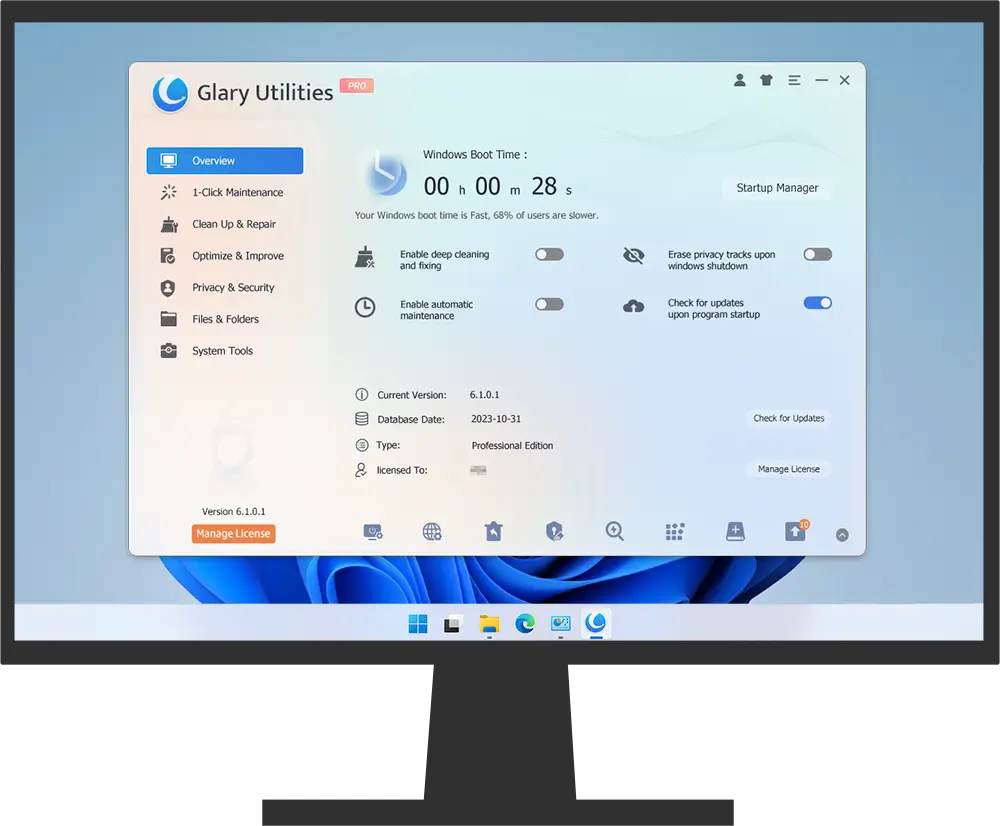
As of 2026, Glary Utilities Pro is an all-in-one Windows utility that deeply cleans and optimizes your PC, built on top of the long-running free Glary Utilities line.
Key areas it focuses on:
- Disk cleanup – finds temporary files, caches, leftover installer files and other junk you can safely remove to free space and reduce disk clutter.
- Registry repair – scans for invalid or leftover registry entries and attempts to tidy them, which can help with odd errors and some slowdowns.
- Startup manager – lets you disable programs that launch with Windows to improve boot time and reduce background load.
- Uninstall manager and file tools – help remove stubborn software, find large/duplicate files, and manage context-menu entries and shortcuts.
- 1-click maintenance – bundles common cleanup and optimization tasks into a single run so non-experts can maintain their system easily.
Glary Utilities Pro adds on top of the free version:
- Automatic background maintenance
- Scheduled cleaning and optimization
- Deeper and faster scans
- Priority technical support
Glary provides Glary Utilities Pro as a 1-year subscription for up to 3 PCs, typically listed at $39.95/year, often discounted by around 50%. A 90-day money-back guarantee gives buyers a long evaluation window.
Glary Utilities Pro – Feature Snapshot
| Feature | Description | Impact on Performance |
|---|---|---|
| Disk Cleanup | Removes temp files, caches, old logs and other junk | Frees storage, can improve disk responsiveness |
| Registry Cleaner | Repairs invalid or leftover registry entries | Helps stability, reduces certain error messages |
| Startup Manager | Disables non-essential startup programs | Shorter boot times, less initial RAM/CPU usage |
| Disk Defragmenter | Reorganizes file fragments on HDDs | Faster file access on mechanical drives |
| 1-Click Maintenance | Bundles common tasks into a single run | Easy quick tune-ups for non-experts |
The interface is simple and slightly old-school: a grid of tools with clear labels. If you like to choose exactly which module to run, Glary’s layout is easy to work with.
Advanced SystemCare: Key Functions and Tools
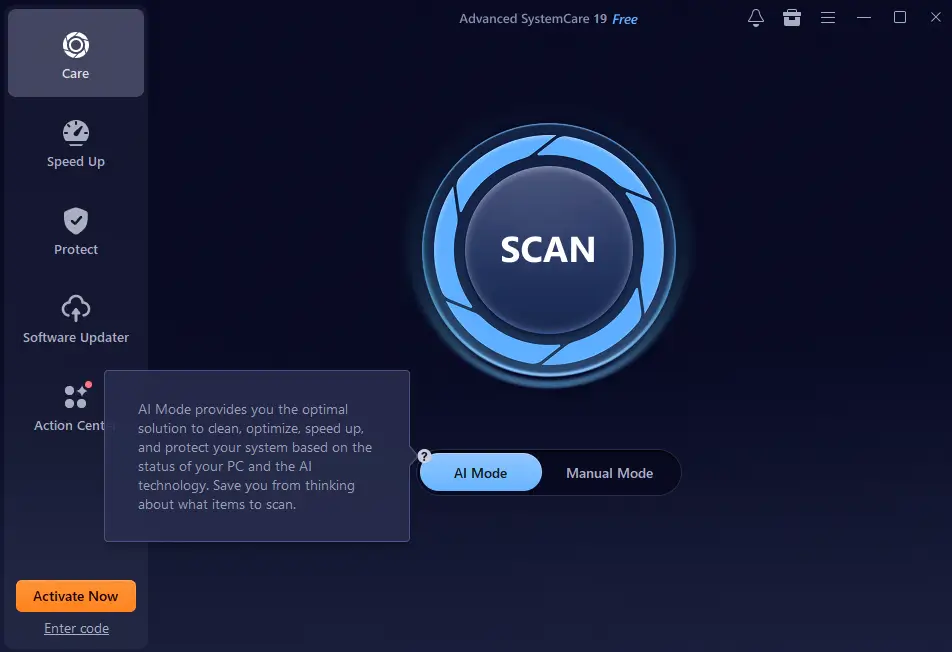
IObit Advanced SystemCare Pro is also an all-in-one Windows optimizer, but leans more into automation, AI-guided cleanup and integrated privacy modules. The current line has reached Advanced SystemCare 18/19, and continues to be marketed as an “AI PC cleaner and optimizer.”
Core Cleaning and Optimization Features
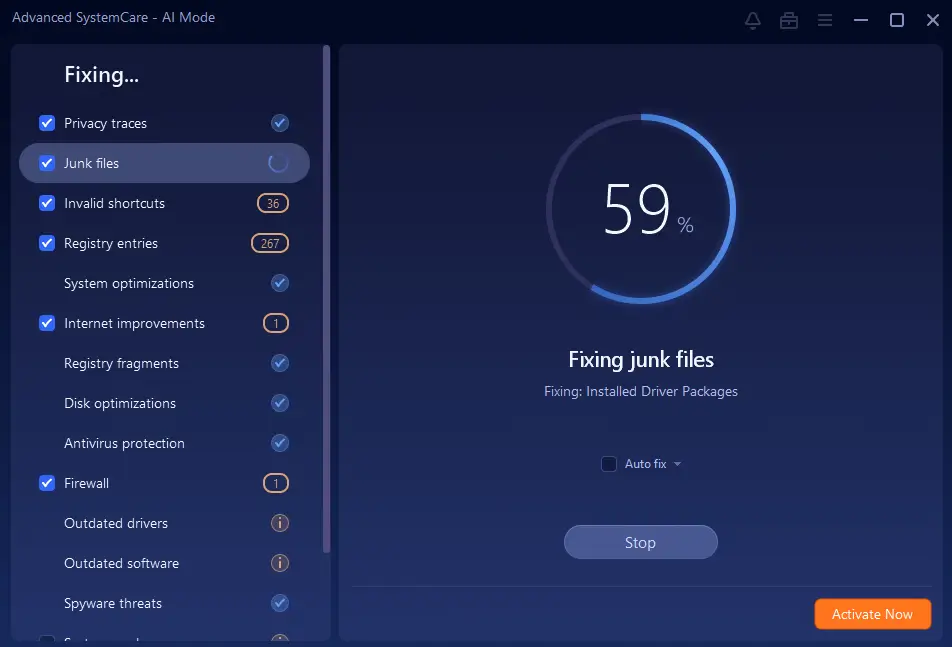
Advanced SystemCare’s main Care scan can include:
- Junk file cleanup
- Registry cleaning
- Shortcut fixing
- Startup optimization
- Basic security checks and vulnerability fixes
Recent versions add a prominent AI Mode that looks at your PC’s condition and your usual choices, then builds a custom cleaning and optimization plan. You can still use the manual “Select what to scan” mode if you prefer control.
Privacy and Security Tools
Advanced SystemCare Pro places more emphasis on privacy than Glary:
- Cleans browser traces, cookies and history from popular browsers
- Clears app traces and activity logs to reduce tracking
- Uses privacy modules to help guard access to sensitive data and settings
- Includes security checks and spyware-blocking features
For full antivirus-style real-time protection, IObit offers related products such as Advanced SystemCare Ultimate in Pakistan, which bundles an antivirus engine, and IObit Malware Fighter. Advanced SystemCare Pro itself is best viewed as an optimization and privacy suite that adds some protective layers, not a complete antivirus replacement.
Performance Boosting Capabilities
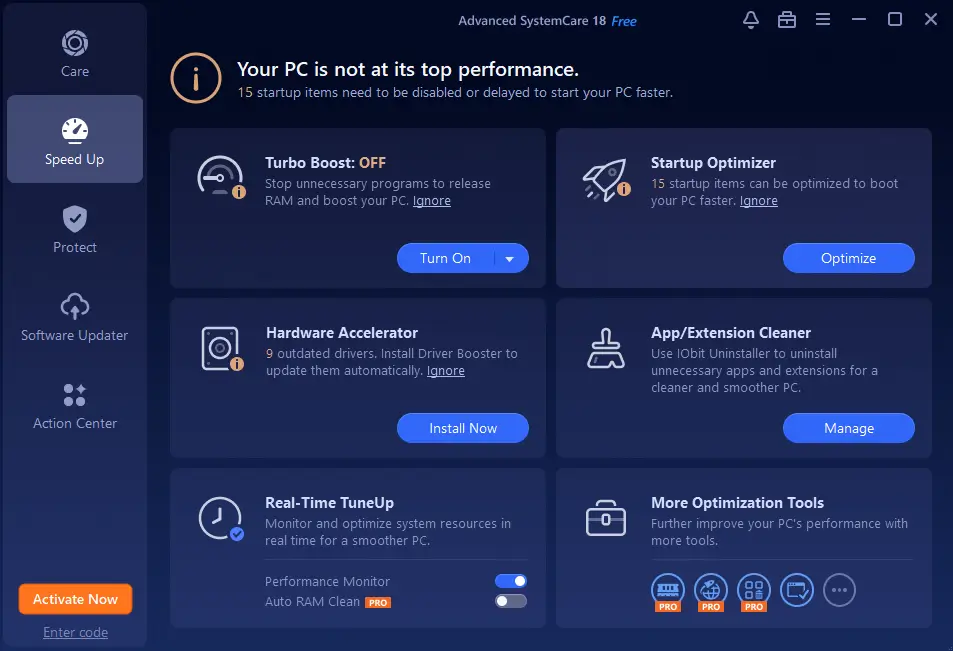
Beyond cleaning, Advanced SystemCare adds performance tools such as:
- Turbo Boost – temporarily disables non-essential services and background tasks for gaming or high-load work sessions.
- Performance Monitor – a small widget that shows CPU, RAM and disk usage and lets you kill heavy processes.
- Network tweaks and browser optimization to help pages and downloads feel more responsive.
| Feature | Description | Benefit |
|---|---|---|
| AI-based Clean | Tailors cleanup plan to your PC and habits | Safer, more focused optimization |
| Privacy Sweep | Wipes traces from browsers and apps | Better privacy, less tracking |
| Turbo Boost | Shuts down background services temporarily | More CPU/RAM for games or heavy workloads |
IObit sells Advanced SystemCare Pro mainly as an annual subscription, with common offers around 1 year for up to 3 PCs, and a 60-day money-back guarantee.
User Interface and Ease of Use Comparison
The user interface is one of the clearest differences between these two suites.
Glary Utilities Pro:
- Classic, light interface with a grid of tools
- List-style 1-Click Maintenance screen
- Minimal animations, low visual noise
- Great if you like direct access to individual modules and a traditional Windows utility look
Advanced SystemCare Pro:
- Dark, modern dashboard with large buttons and system status indicators
- AI Mode and “Care” scans front and center
- Extra sections for Speed Up, Protect, Toolbox, etc.
- Feels more like a guided assistant, especially for less technical users
| Aspect | Glary Utilities Pro | Advanced SystemCare Pro |
|---|---|---|
| Layout | Tool grid, module-first | Dashboard with guided scans |
| Visual Style | Simple, light, traditional | Dark, modern, animated |
| Navigation | Direct tool access | Central AI/Care scan with additional sections |
| Best For | Users who like detailed manual control | Users who prefer automation and suggestions |
If you want a “press one button and let it decide” experience, Advanced SystemCare Pro is more appealing. If you prefer to pick and run individual tools, Glary feels more natural.
Performance Impact: Speed and System Resource Usage
There is no single benchmark that perfectly represents every PC, but we can look at how each tool approaches performance in 2026.
Startup Time Improvements
Both Glary Utilities Pro and Advanced SystemCare Pro try to improve boot times by:
- Managing startup programs
- Cleaning leftover entries and scheduled tasks
- Reducing background clutter
Glary focuses heavily on startup management and disk cleanup, which can make older HDD-based systems boot noticeably faster once unnecessary items are removed.
Advanced SystemCare adds service tweaks and optional Turbo Boost to squeeze extra performance out of mid-range and older machines, particularly when gaming or running heavy apps.
RAM and CPU Utilization
Both tools can help stabilise RAM and CPU use:
- Glary Utilities Pro frees memory mainly by closing background applications and clearing temporary files.
- Advanced SystemCare Pro adds live monitoring of CPU, RAM and disk, plus quick actions to close resource-hungry programs and services.
You should not expect miracles on very under-powered hardware, but on a typical 4–8 GB RAM Windows 10/11 machine that hasn’t been cleaned in a while, either suite can make multitasking feel smoother.
Overall System Responsiveness
In everyday use:
- Glary Utilities Pro is very good as a weekly or monthly maintenance tool that slows down the natural “PC rot” that comes from installing and uninstalling software.
- Advanced SystemCare Pro is stronger if you want ongoing tweaks: its monitoring, Turbo Boost and AI features can give you more real-time tuning options.
A sensible best practice in 2026 is to:
- Create a restore point or backup before running deep registry repairs or aggressive system tweaks.
- Start with default or conservative settings and only enable “deep” or “aggressive” modes once you are comfortable.
Pricing and Value for Money in 2026
Pricing moves around with sales and bundles, but the broad picture in 2026 looks like this:
Glary Utilities Pro
- Free basic version available
- Glary Utilities Pro: typically $39.95/year for up to 3 PCs, often discounted by 50% on the official site
- 90-day money-back guarantee, which is longer than many competitors
Advanced SystemCare Pro
- Free edition of Advanced SystemCare with limited features
- Advanced SystemCare Pro: generally sold as a 1-year subscription, with frequent deals around the 1-year/3-PC tier
- 60-day money-back guarantee on purchases from IObit
| Feature | Glary Utilities Pro | Advanced SystemCare Pro |
|---|---|---|
| Free Version | Yes | Yes |
| Typical Premium Price | Around $39.95/year, often discounted for 3 PCs | Discounted 1-year plans, often for 1–3 PCs |
| Licensing Model | Annual subscription | Annual subscription |
| Money-Back | 90-day guarantee | 60-day guarantee |
If you want multi-PC coverage and a long refund window, Glary Utilities Pro offers strong value. If you want more automation, privacy modules and performance tweaks, Advanced SystemCare Pro offers more features per PC, at the cost of a heavier upsell and promotion ecosystem.
Glary Utilities Pro vs Advanced SystemCare: Head-to-Head Feature Comparison
Here’s a side-by-side look at how both suites compare on the key things users care about in 2026:
| Area | Glary Utilities Pro | Advanced SystemCare Pro |
|---|---|---|
| Disk Cleanup | Strong, configurable junk cleanup | Strong cleanup integrated into AI/1-click scans |
| Registry Repair | Comprehensive registry tools | Registry cleaning as part of main scan |
| Performance Boost | Solid tune-up and startup optimization | More aggressive boosts (Turbo Boost, live monitoring) |
| Malware/Security | Basic spyware/privacy helpers, not full antivirus | Stronger security modules; full AV via ASC Ultimate |
| Privacy Tools | Browser and trace cleanup | Extensive privacy sweep and fingerprint masking |
| Automation | 1-click maintenance and scheduling | AI mode, scheduled scans, lots of automation options |
| Learning Curve | Slightly more manual, tool-centric | More guided, friendly for non-technical users |
Privacy and Security Measures
In 2026, Google and security experts both expect more clarity around what a tool actually protects. It’s important to separate maintenance from security.
Data Protection Capabilities
- Glary Utilities Pro: provides secure file deletion, browser trace cleanup and some privacy-oriented tools, but it is not marketed or engineered as a full security suite. You still need a dedicated antivirus.
- Advanced SystemCare Pro: adds real-time privacy protection, browser protection and some spyware-blocking capabilities. For proper anti-virus and anti-malware, you should combine it with a mainstream antivirus or move to a bundle like Advanced SystemCare Ultimate.
Anti-Malware and Spyware Features
- Glary’s protection is best thought of as “extra cleanup and spyware/adware removal” rather than a primary defence.
- Advanced SystemCare Pro’s modules are more capable and include real-time privacy and threat-blocking, but serious security strategies still rely on a dedicated antivirus and, ideally, a backup solution for ransomware resilience.
Secure Browsing Options
- Glary Utilities focuses on removing browsing traces and cleaning your browsers afterwards.
- Advanced SystemCare adds browser protection features designed to block malicious sites and risky downloads when you surf, depending on which components you turn on.
From a security best-practice standpoint in 2026, both tools should be treated as complements to a good antivirus and backup strategy.
Customer Support and Community Resources
Glary Utilities Pro:
- Email-based support and ticket system
- Knowledge base articles, documentation and basic how-to guides
- Smaller but loyal user base and fewer marketing pop-ups inside the app
Advanced SystemCare Pro:
- Email support for Pro users, and active sales/support channels
- Detailed online documentation and help manuals
- Larger community of users, more third-party reviews, videos and tutorials
If you value tutorials, walkthroughs and community advice, Advanced SystemCare’s ecosystem is bigger. If you prefer a quieter experience with fewer prompts and ads, Glary will likely feel calmer.
Compatibility and System Requirements
Both suites are lightweight enough for older hardware but fully support modern Windows.
Glary Utilities Pro:
- Supports Windows XP, Vista, 7, 8, 8.1, 10 and 11, 32-bit and 64-bit
- Official minimum requirements are extremely low (tens of MB of RAM and disk), but in practice you’ll want at least 2–4 GB of RAM for a comfortable 2026 Windows 10/11 machine
Advanced SystemCare Pro:
- Supports Windows 7, 8, 8.1, 10 and 11
- Designed to run on modest hardware, but benefits from at least 4 GB of RAM and a dual-core CPU
For both, performance gains are most noticeable on machines that already meet reasonable modern specs but have become cluttered and slow over time.
Conclusion
Glary Utilities Pro vs Advanced SystemCare in 2026 mostly comes down to control vs automation. Both can clean junk, reduce startup clutter, and help an older Windows PC feel smoother when used regularly.
Choose Glary Utilities Pro if you want a calmer, more traditional toolbox with clear modules, manual control, and solid value for up to three PCs. Choose Advanced SystemCare Pro if you prefer a more guided experience with AI-based scans, Turbo Boost, performance monitoring, and extra privacy tools.
Neither tool replaces a proper antivirus or backup plan, and neither can fix failing hardware. But used alongside Windows updates, security software, and basic backups, either one can help extend the useful life of your PC.
Further Readings
If you are comparing IObit Advanced SystemCare and Glary Utilities Pro, these related guides can help you understand the wider PC cleanup, speed, and optimization picture.
- Best PC Optimizer Software
- IObit Advanced SystemCare Review
- Glary Utilities Review 2026
- How to Optimize Your Windows 11 PC
- Why Is My Laptop So Slow?
For more cleanup, speed, and Windows performance guides, visit the TechBre PC & Laptop Optimization area.