Disclosure: We may earn a commission from links on this page. Learn more.
Vidnoz AI Review 2026: Features, Pricing, Avatars, Voices, Pros and Cons
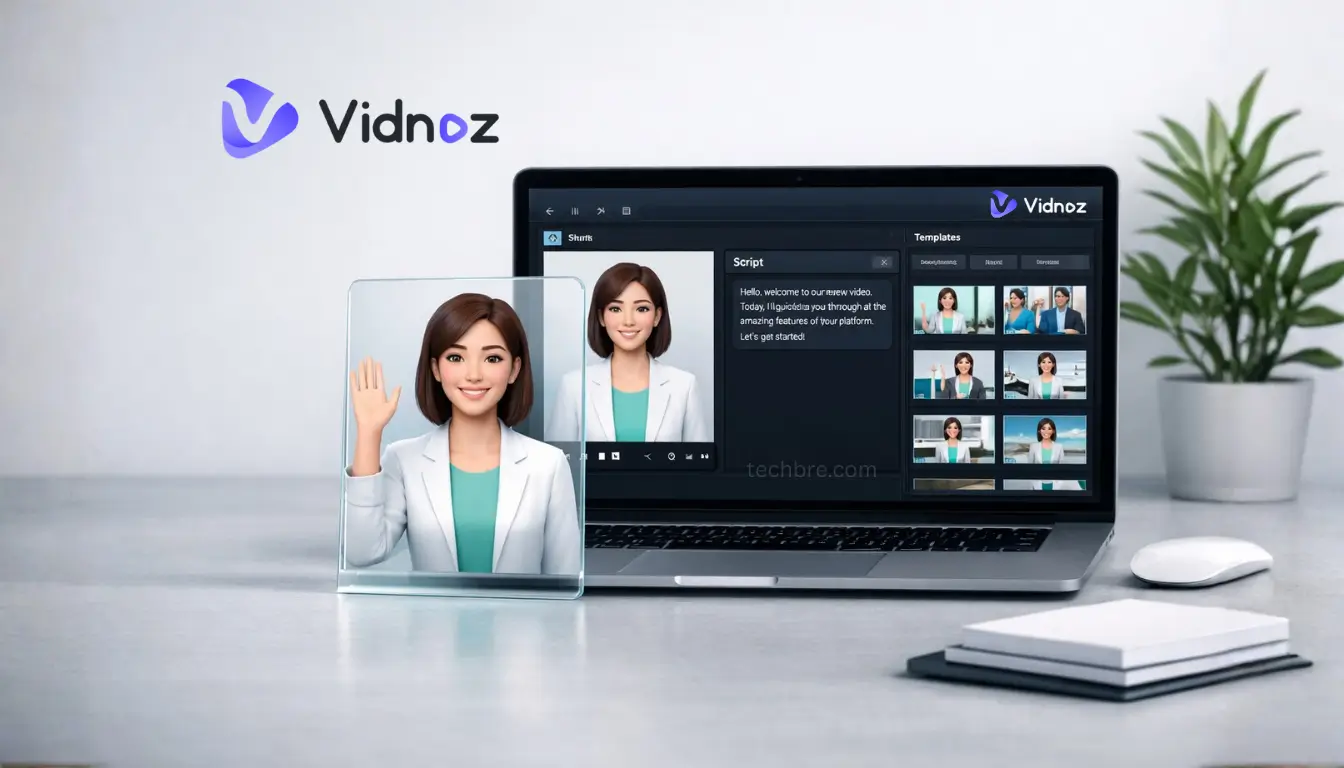
Vidnoz AI Review 2026 looks at whether this AI video generator is a good fit for avatar videos, explainer videos, and fast video creation. Vidnoz is a cloud-based platform that helps creators and small teams produce videos within minutes using templates, AI avatars, and AI voices.
Many AI video tools look strong in demos, but real use depends on plan limits, credits, export options, and output quality. The free tier can help you test the platform, but daily limits, watermark rules, and pacing issues can affect results.
This Vidnoz AI review 2026 covers key features, pricing, free plan limits, avatars, voices, and common use cases. It also explains where Vidnoz works well and when an alternative like Synthesia may be a better choice.
Vidnoz AI is designed for fast AI-powered video creation, especially talking avatar videos, onboarding clips, and short social content. The free plan is useful for testing, while paid tiers offer more credits, better exports, and fewer limits.
Quick Verdict
- Best for: Content creators, small businesses, and teams that need fast AI video creation using avatars, templates, and AI voices.
- Skip if: You need advanced motion graphics, detailed editing controls, or highly polished video production workflows.
Vidnoz AI works best as a fast AI video generator for explainer videos, onboarding clips, short-form videos, and simple social media content. The platform focuses on speed and templates rather than deep editing.
The free plan is useful for testing avatars, voices, and video templates, but daily credits, watermark limits, and export restrictions may affect regular content production.
Public user feedback is mixed. On Trustpilot, Vidnoz currently has a 2.5/5 rating based on 78 reviews.
Current Vidnoz deals:
- Vidnoz AI Starter Plan: Up to 45% off
- Vidnoz Gen: Up to 57% off
- Expressive Avatar: Exclusive 20% off
Note: Promos and plan limits can change—confirm the final discount and terms at checkout.
Vidnoz AI Comparison at a Glance
| Tool | Best for | Where it wins | Watch-outs |
|---|---|---|---|
| Vidnoz AI | Fast avatar videos | Speed + templates | Realism varies, plan limits |
| HeyGen | Marketing-style avatar clips | Creator-friendly workflow | Can get expensive |
| Synthesia | Training/L&D videos | Polished business output | Higher cost |
| CapCut / VEED | Editing real footage | More editing control | Not avatar-first |
Vidnoz AI Review: What It Is and How It Works
Vidnoz AI Review Summary: Who It’s For and What You Can Create
Vidnoz AI is an AI video generation platform designed to help content creators, small businesses, and teams create videos quickly using templates, AI avatars, and AI voices. It’s built for speed and repeatable formats rather than deep, timeline-style editing.
It’s commonly used for short promos, explainer videos, training clips, onboarding videos, and simple talking-avatar presentations. If you need advanced editing, detailed motion work, or heavy brand customization in every scene, you may want a more editing-focused tool.
Overview of Vidnoz AI
Vidnoz AI simplifies video creation by offering a range of AI features, including AI avatars, realistic AI voices, and video templates. It helps users create engaging videos without needing advanced video editing skills.
It’s a solid pick for fast, template-based avatar videos, especially if you want results without learning full timeline editing.
Core Workflow (Script -> Scene -> Voice -> Export)
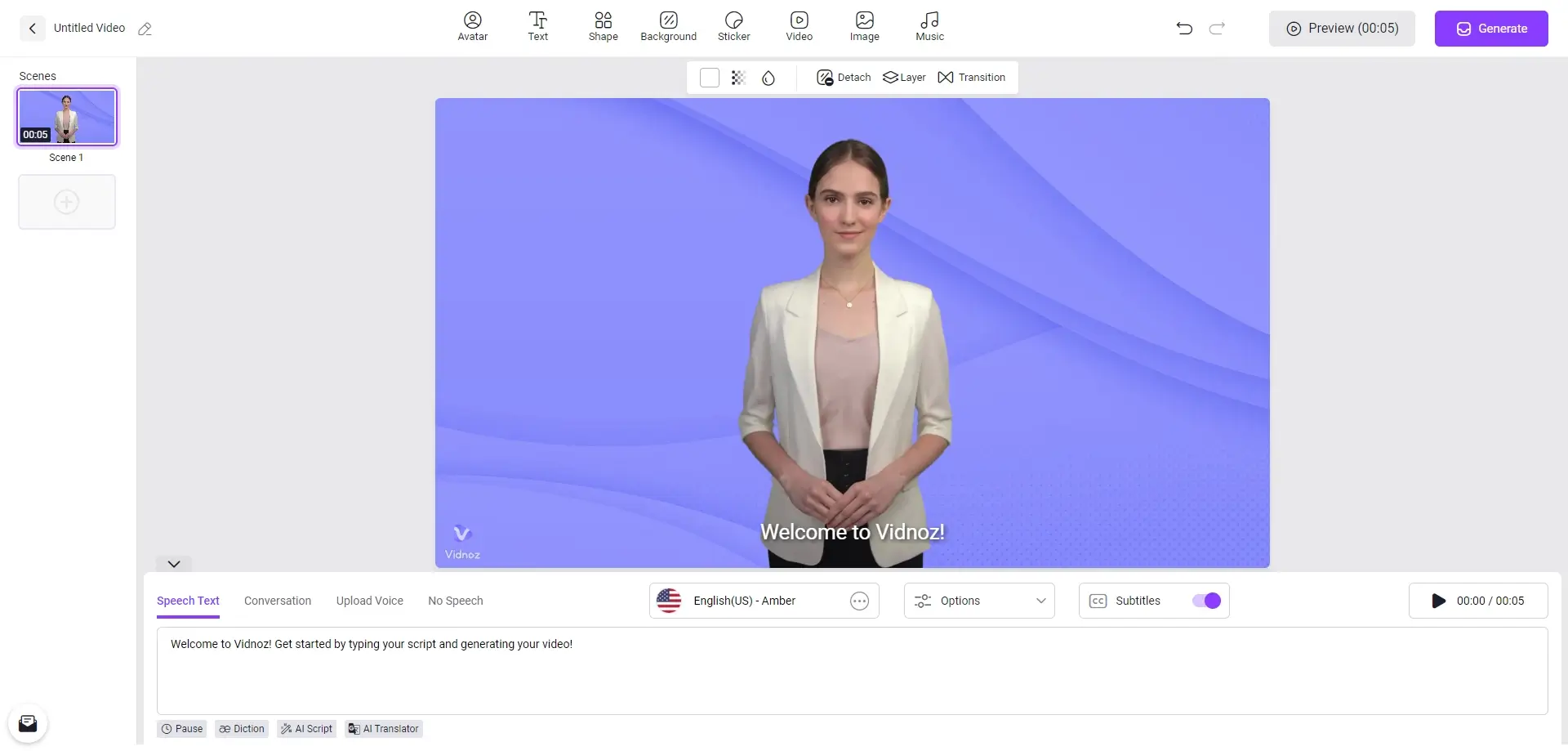
Most videos follow the same workflow:
- Pick a template (or start blank) and choose an avatar style.
- Paste your script, choose a voice, and adjust pacing.
- Tweak scenes, text, visuals, and music to match your message.
- Generate and export, then review captions and timing before publishing.
What You Can Create and Best Use Cases
Vidnoz AI works best for short, repeatable video formats where a talking avatar plus simple visuals is enough. Common use cases include:
- Explainer videos for products, apps, and services
- Onboarding and training clips
- Simple promos and announcements for social media
- Talking-avatar presentations for internal updates
If you need heavy motion design, advanced cuts, or detailed timeline editing, export your draft and finish it in a full video editor.
Setup: What to Do Before Your First Video
Pick the Right Format (Landscape vs Vertical)
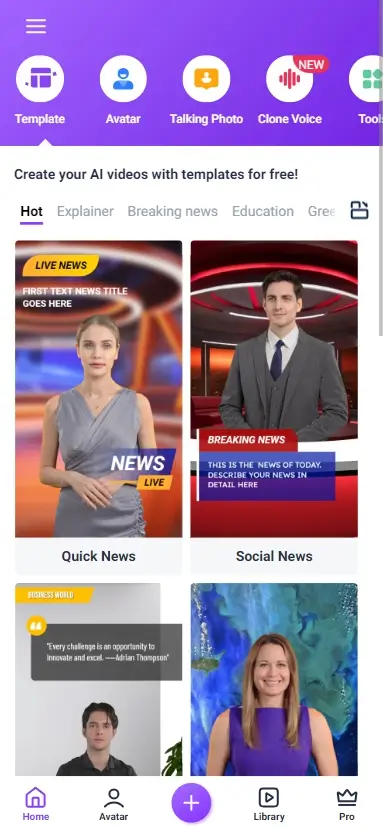
Choose the video format based on where you plan to publish. Landscape works better for YouTube, websites, and training videos, while vertical fits TikTok, Instagram Reels, and other mobile-first platforms. Picking the right format early helps your video look cleaner and reduces extra editing later.
Script Tips for Natural Results
When writing your script, use simple and conversational language. Short sentences usually work better for AI avatars and AI voices, especially in explainer videos and onboarding clips. For better results, match the script tone to your template, audience, and use case.
Choosing Templates vs Starting from Scratch
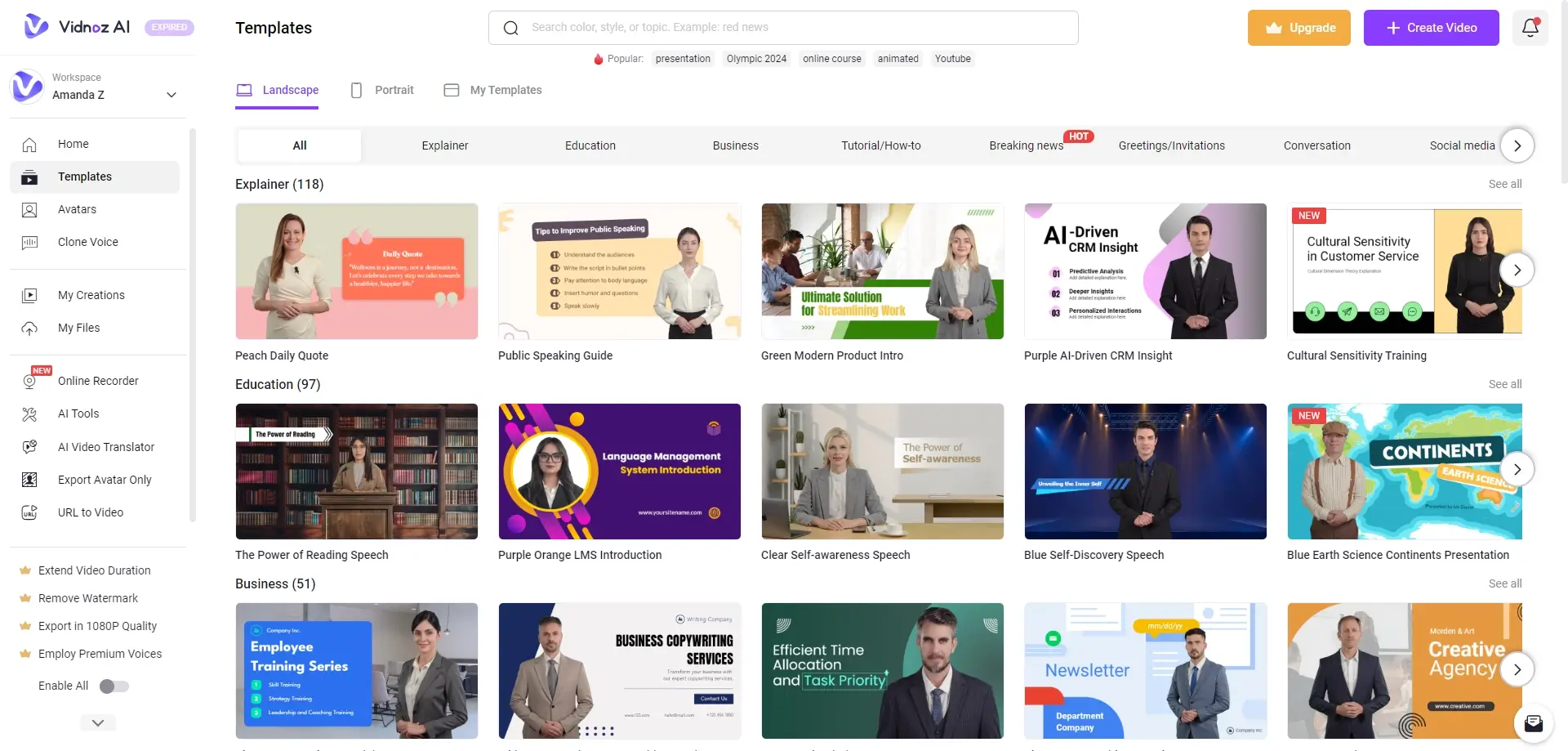
Choosing between a template and starting from scratch depends on how fast you need to publish and how much control you want. Templates are useful for quick video creation, while a blank project gives you more flexibility for custom scenes and branding. If you are new to Vidnoz AI, templates are usually the easier starting point.
Vidnoz AI Key Features That Matter
AI Video Creation Workflow
Vidnoz AI uses a simple, AI-driven workflow that turns text into videos with minimal setup. You write a script, select a template and avatar, choose a voice, and export the video in minutes.
This approach removes the need for timeline-based editing and makes video creation accessible to beginners. The main advantage is speed: script → scenes → voice → export, with basic edits available before publishing.
Avatars, Talking Videos, and Voice Cloning
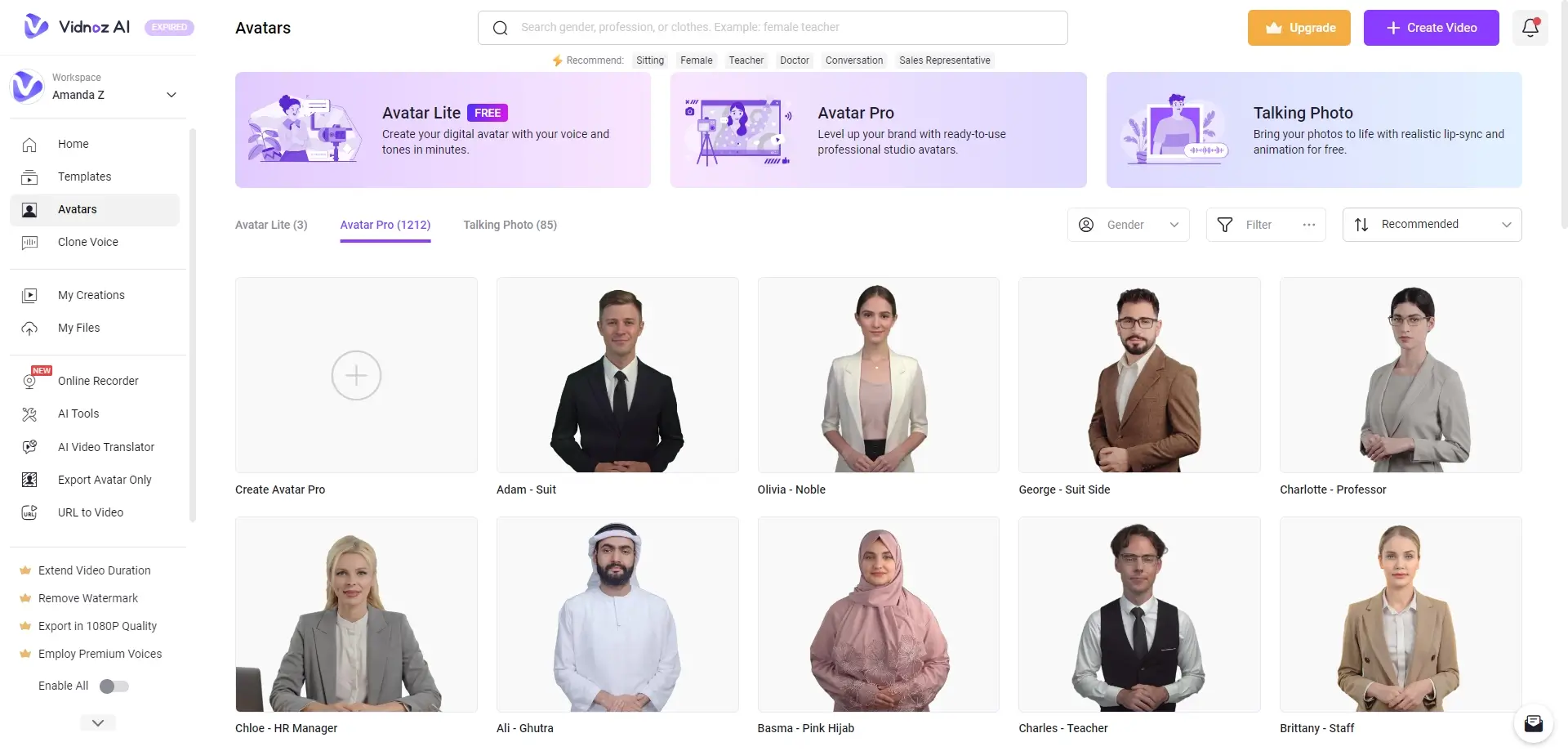
Vidnoz AI focuses heavily on talking avatar videos, offering expressive avatars with natural facial movement and lip-sync. These avatars are designed for explainers, promos, onboarding, training content, and other repeatable video formats.
Vidnoz currently promotes 1,900+ AI avatars on its official site. Scene length and avatar usage limits depend on your plan, with some scenes capped at up to 5 minutes per video. Supported plans may also include custom avatar creation and a larger AI voice library, with voice cloning on higher tiers where available.
Templates, Scenes, and Text-to-Video
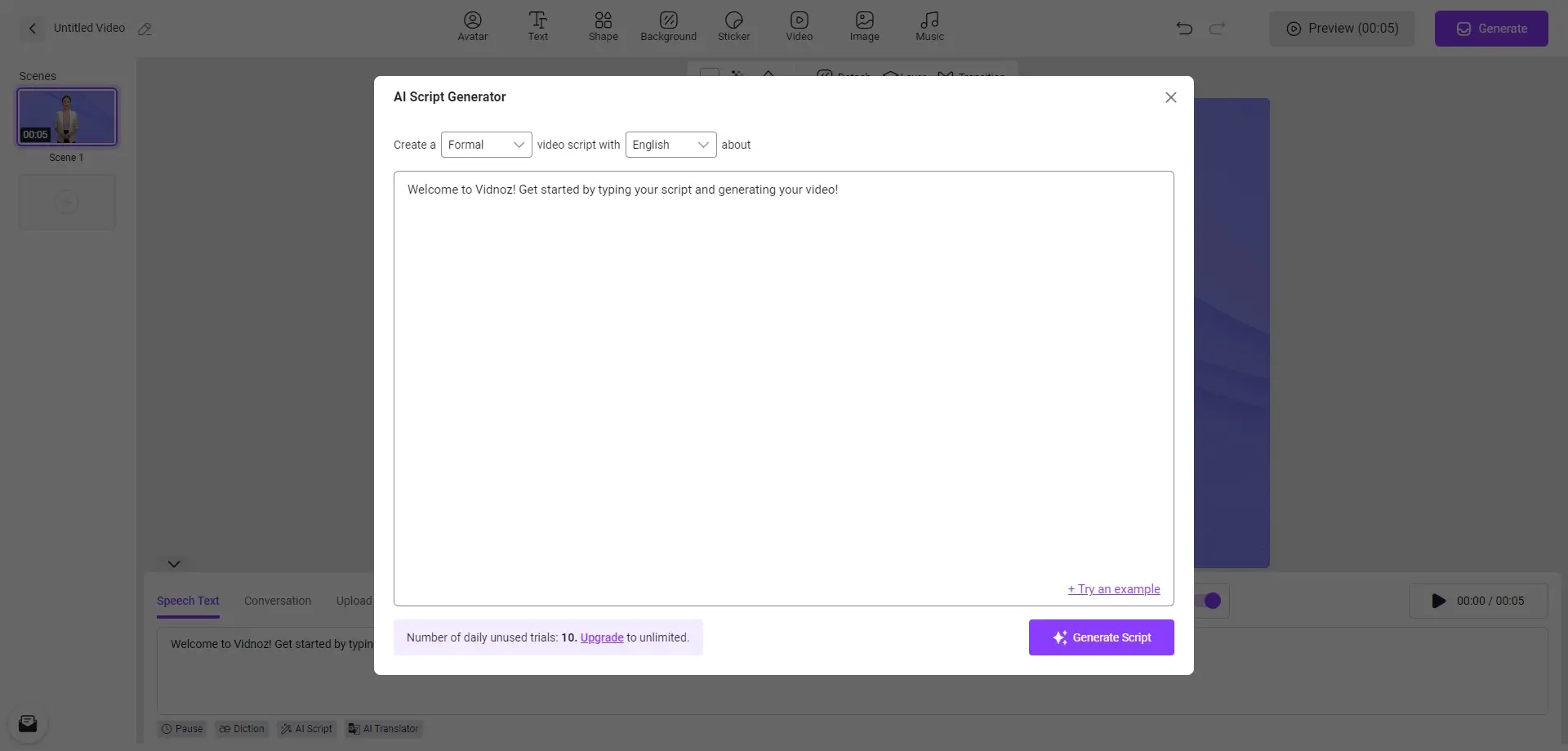
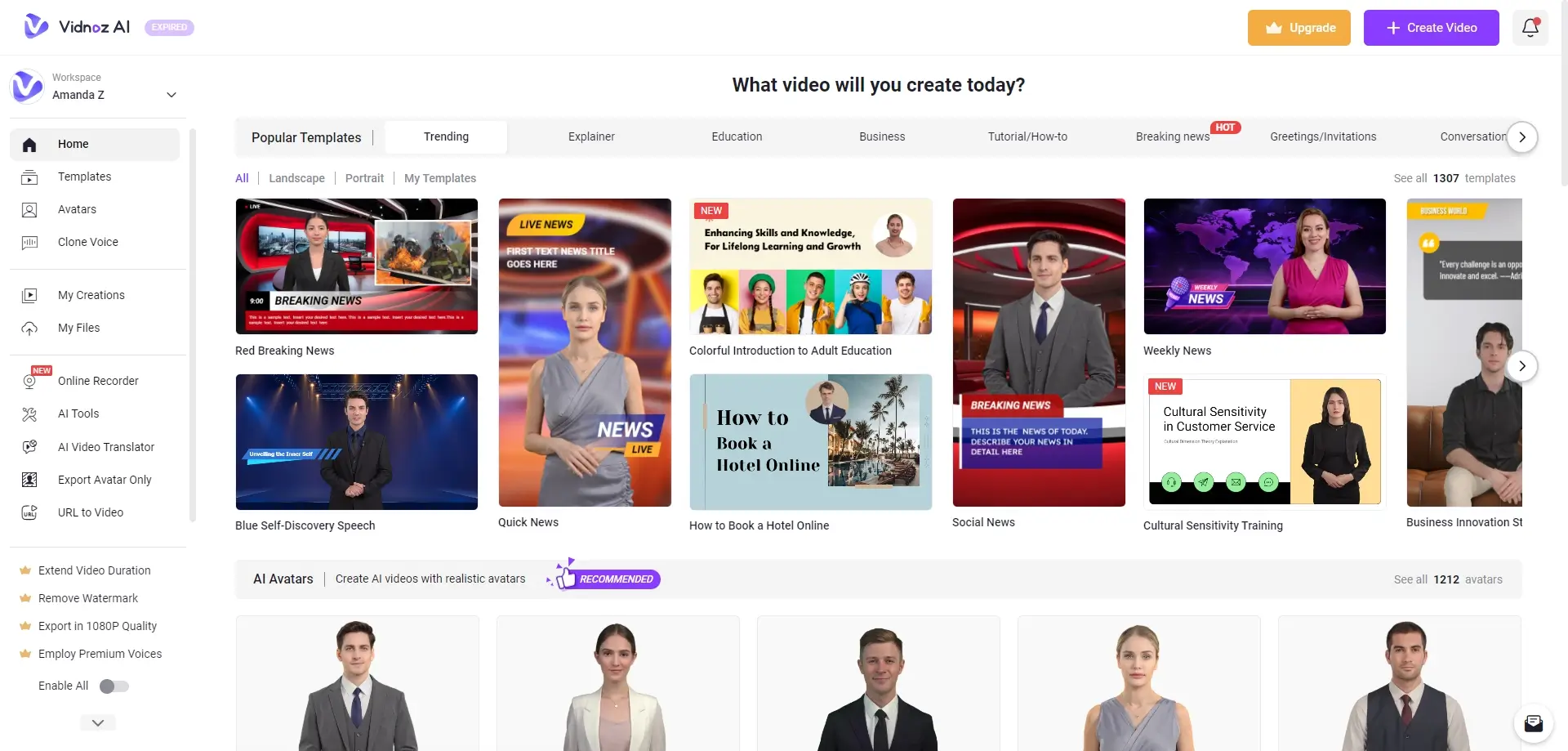
Vidnoz promotes 2,800+ templates for common formats such as explainer videos, training clips, promo content, and social media posts. Templates are useful for speed, but videos usually look more custom when you shorten scenes, reduce on-screen text, and keep spacing and branding consistent.
Vidnoz AI also includes AI Video Wizard as part of its video creation workflow, which is designed to help users turn ideas into videos faster. That makes it useful for creators who want quicker video production without building every scene manually.
Subtitles, Translation, and Language Support
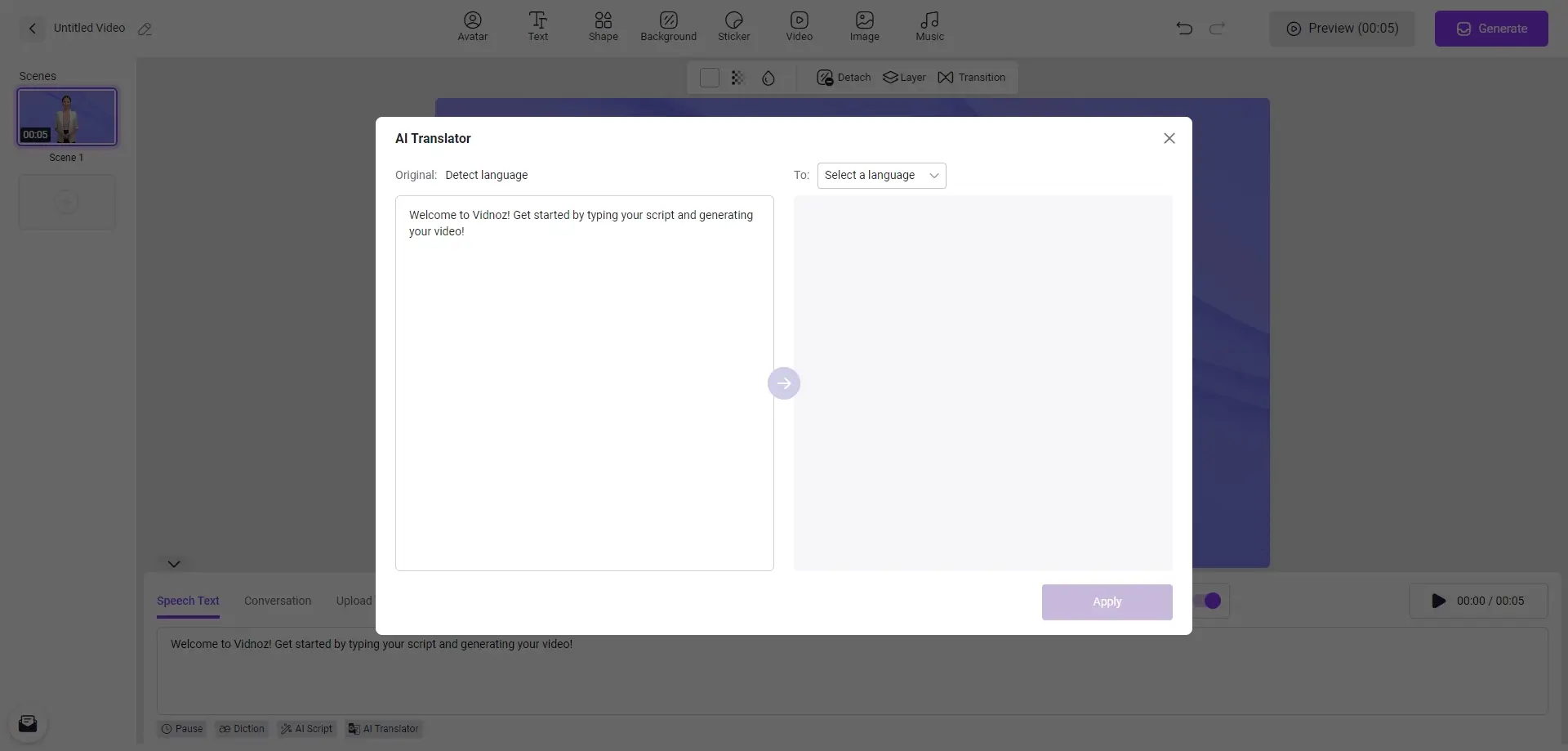
Vidnoz promotes video translation and localization for 140+ languages. Auto subtitles and translation are a good starting point, but a quick human review is still important to fix names, timing, and line breaks.
If you already have captions, Vidnoz also supports uploading proofread subtitle files such as SRT or ASS, which can help keep the final export in sync.
Branding, Export Quality, and Editing Controls
Vidnoz Business plans include a Brand Kit and a branded video page, helping teams keep logos, colours, and calls to action more consistent across projects. Some plans also allow CTA buttons on the video page, depending on the tier.
Users can download the generated video or share it online. Vidnoz AI offers different export options, but editing controls are still more limited than in full video editing software, so it works best for fast production rather than advanced creative editing.
Real-World Workflows (With Fixes)
Creating a 45–60 Sec Product Promo
To create a product promo with Vidnoz AI, start with a short script that highlights key features and benefits. Choose a professional template and an AI avatar that fits your brand, then use text-to-speech for the voiceover. Add music, simple visuals, and short scenes to keep the video clear and engaging.
Common issues here include pacing that feels too fast, captions that need correction, and a voice tone that does not match the message. For better results, slow down narration slightly, proofread captions before export, and test a few AI voices before finalizing the video.
Developing a Training/Onboarding Clip
For training clips and onboarding videos, focus on clear and concise content. Use templates designed for education or step-by-step guidance, and keep each scene short enough for viewers to follow comfortably. AI avatars can help present information in a more engaging way, especially for repeatable internal content.
The most common problems are robotic delivery and slides that feel too long. A more conversational script usually improves the result, and shorter scenes with cleaner visuals make the final video easier to watch.
Producing Short-Form Videos (Shorts/TikTok Style)
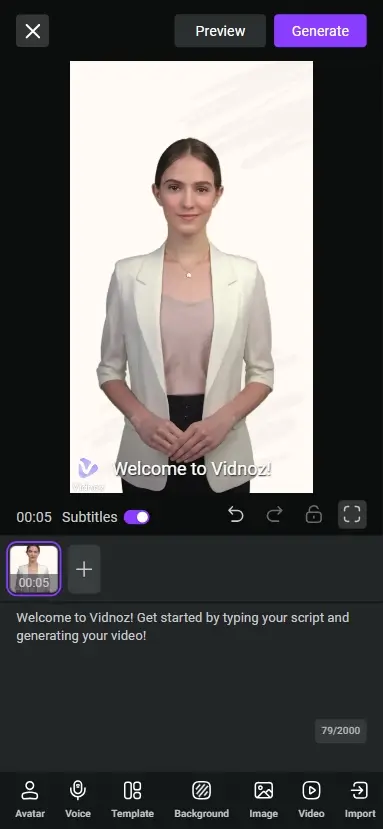
To produce short-form videos, begin with a strong hook that captures attention quickly. Use Vidnoz AI templates built for mobile viewing, keep the pacing tight, and focus on one simple message per video. This format works best for social media updates, short promos, and fast explainer content.
Common issues include weak openings, rushed timing, and cluttered layouts. A clearer hook, fewer on-screen elements, and shorter scenes usually make short-form videos more effective.
Vidnoz AI Pricing, Free Plan Limits, and Credits
Credits, Minutes, and Plan Tiers
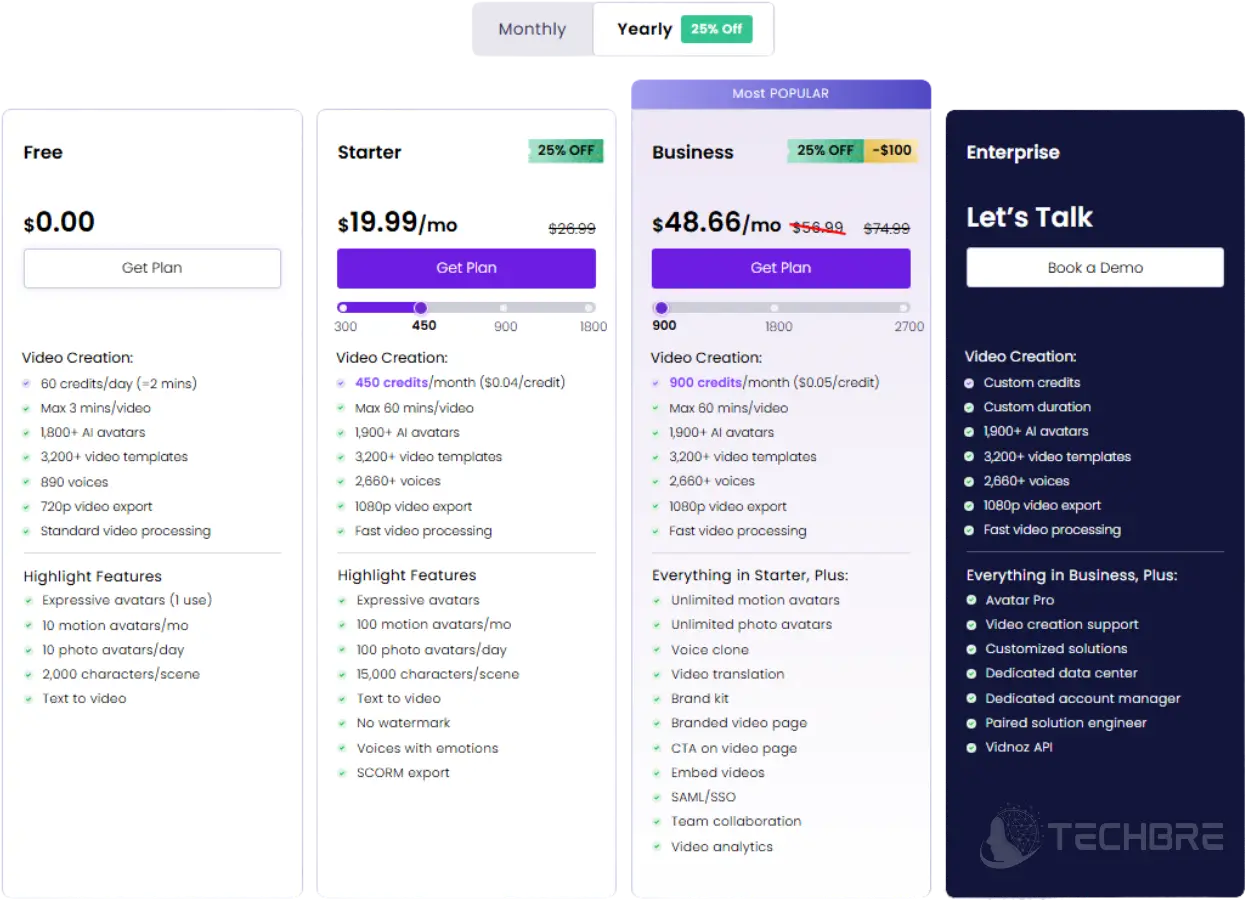
Vidnoz AI pricing is based on a credit system. According to the Vidnoz pricing page, standard video generation typically costs 0.5 credits per second (minimum 1 credit), while Expressive Avatar videos can cost 2 credits per second (minimum 2 credits).
Vidnoz says standard AI video generation costs 0.5 credits per second, while Expressive Avatar generation costs 2 credits per second.
Vidnoz AI Free Plan Limits (2026)
Vidnoz AI offers a free plan with 720p export, a maximum of 3 minutes per video, and Vidnoz watermarking, so it is better for testing than heavy use.
Because of these limits, the free plan is mainly useful for testing the platform before upgrading to a paid tier.
Watermarks, Export Quality, and Plan Differences
The main differences between Vidnoz plans usually involve watermark removal, export resolution (such as 1080p), monthly credit limits, and maximum video length.
Higher tiers may also include commercial-use rights, faster video generation, team collaboration features, and access to more avatars or templates depending on the current plan structure.
Check the Latest Vidnoz Plan Details
Before purchasing, review the latest Vidnoz AI pricing and plan details on the official pricing page. Credit costs, export limits, and available features can change over time, so confirm the current plan table to ensure it matches your intended usage.
If you are in Pakistan and want local purchase support, you can also buy Vidnoz from BreTech.
Pros and Cons of Vidnoz AI
| Pros | Cons |
|---|---|
| Fast Production: Create marketing videos in minutes using a large template library. | Limited Editing: The simplified editor lacks the depth of full video editing software. |
| Large Avatar Library: Vidnoz offers 1,900+ AI avatars with lip-sync support. | Plan Limits: Watermark-free exports and higher-quality output usually require a paid plan. |
| Strong Language Support: Useful for multilingual content and localization. | Template Repetition: Some videos can feel similar without custom branding or scene edits. |
| Easy to Use: The dashboard works well for beginners, creators, and small teams. | Credit Caps: Lower tiers may feel restrictive for frequent video production. |
Privacy and Data Considerations
What to Check Before Uploading Content
Before uploading files, review Vidnoz AI’s privacy policy and any available security documentation. Avoid uploading sensitive or confidential content unless you are comfortable with the platform’s retention, access, and account protection policies.
Practical Privacy Notes for Creators and Teams
Creators and teams should use a unique password, enable two-factor authentication if available, and review account access regularly. It is also a good idea to set internal rules for data handling, especially when working with client content, private scripts, or branded assets.
Vidnoz AI vs Synthesia and Other Alternatives
When Vidnoz AI Is the Better Pick
Vidnoz AI is the better choice when your priority is fast AI video creation using templates, AI avatars, and ready-made workflows. It works well for explainer videos, onboarding clips, social content, and other repeatable formats where speed matters more than deep editing control.
When an Alternative Makes More Sense
An alternative like Synthesia or HeyGen may be a better fit if you need more polished output, stronger avatar quality, or more advanced control over the final video. These tools can make more sense for teams that need higher-end business videos, multilingual content, or more refined presentation quality.
Final Verdict
Vidnoz AI is a practical choice if you want fast AI avatar videos without spending hours learning a full video editor. It works best for template-based promos, simple explainers, onboarding clips, and short social media videos where speed and consistency matter more than deep creative control.
Before upgrading to a paid plan, review the factors that most affect real output: export quality, watermark rules, and usage limits such as credits or video minutes. If you need deeper editing controls or more polished production quality every time, a more advanced video platform may be a better fit.
Explore more offers: TechBre Deals & Coupons
Further Reading
- Best AI Video Generators in 2026
- InVideo AI Review 2026
- AI Automation Tools for Content Creators
- HitPaw Video Converter Reviews 2026
- Best Video Editing Software Deals (2026)
FAQs About Vidnoz AI
Q: Is Vidnoz AI free to use?
A: Yes. Vidnoz AI includes a free version for testing this AI video generator, but the free plan has limits on credits, export quality, and video length compared with paid tiers.
Q: What kind of AI video tool is Vidnoz AI?
A: Vidnoz AI is a cloud-based video creation platform designed for speed. It helps users create Vidnoz AI video projects with templates, avatars, voices, and simple text-to-video workflows.
Q: How many avatars does Vidnoz AI have?
A: Vidnoz promotes a large library of avatars, with more than 1,900 AI avatars available. That gives creators and educators more options for repeatable video content and different use cases.
Q: Can I use Vidnoz AI for talking photo videos?
A: Yes. Using Vidnoz AI, you can create talking photo or avatar-style videos from a still photo, making it useful for simple presenter clips, social content, and fast visual explainers.
Q: Is Vidnoz AI good for professional videos?
A: Vidnoz can work for professional videos when you need fast explainers, onboarding clips, or social content, but it is better for speed than for deep editing or highly polished production work.
Q: Is Vidnoz AI good for multilingual content?
A: Yes. Vidnoz supports video creation across multiple languages and is useful for teams that need to produce content for different audiences without rebuilding every video from scratch.
Q: Can Vidnoz AI help maintain brand consistency?
A: Yes. Vidnoz can help maintain brand consistency across projects by using templates, recurring avatar styles, and reusable video assets, especially for teams making repeatable content.
Q: Is Vidnoz AI better than Synthesia for every use case?
A: No. Vidnoz is better when you want a free AI video tool designed for speed, while Synthesia may be a better fit for users who want more polished business-style presentation videos.