Is WinRAR safe to use? Yes, if you install it from the official site and keep it updated, but extracting unknown archives still carries a real security risk on Windows.
Most problems come from using an old version or opening archives from random emails and unofficial downloads. WinRAR has had exploited bugs in the past, so running outdated builds is an unnecessary patching risk.
The safe path is simple: download WinRAR from the official source, update manually when new versions release, and scan every unknown archive before extracting. This guide shows the safe workflow for WinRAR in 2026.
Understanding WinRAR and Its Purpose
What is WinRAR?
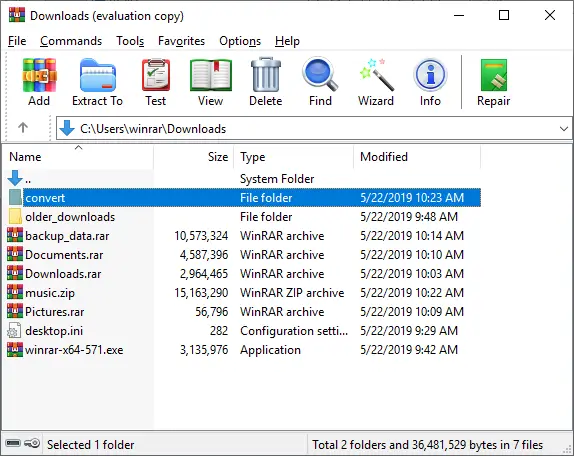
WinRAR is a popular file archiver utility for Windows, developed by Eugene Roshal. It’s primarily used to compress files into smaller archives, typically in RAR or ZIP formats, for easier storage, sharing, and transfer.
WinRAR can also unpack various archive file formats, including RAR, ZIP, 7Z, ACE, ISO, and many others. The application provides additional features such as archive splitting, encryption, and the creation of self-extracting archives.
How Does File Compression Work?
File compression reduces the size of files by removing redundancy and patterns within the data. Algorithms identify and eliminate repetitive information, encoding the data in a more efficient manner. When you use WinRAR to compress files, it employs these algorithms to create a smaller archive.
This is particularly useful when you need to send large files via email or store them on limited storage space. Compressing and extracting files is a common practice to optimize file management.
Why Use WinRAR?
People rely on WinRAR because it efficiently compresses files and folders into a single archive, making it easier to manage and share large amounts of data. WinRAR supports multiple archive formats including RAR and ZIP, offering flexibility in how you compress files.
It also includes features like password protection, which enhances the security of your archives. Furthermore, WinRAR can split large archives into smaller, more manageable parts, making it easier to transfer them across different media.
Ready to get started? Download the Latest Official WinRAR
If you’re in Pakistan and want a genuine license with local support, you can buy WinRAR here: WinRAR License (Pakistan).
Is WinRAR Safe to Use in 2026?
Quick Safety Answer
WinRAR is generally safe when you download it from the official website and keep it updated. The biggest risk is opening unknown archives from emails, ads, and random downloads.
- Download only from the official site to avoid fake installers and bundled malware
- Update WinRAR regularly so you don’t stay on an old vulnerable version
- Scan unknown ZIP/RAR files before extracting, especially if they came from someone you don’t trust
Common Misconceptions: Is WinRAR a Virus?
Here’s how to understand the situation: the official WinRAR software is not a virus. The danger arises from how malware is distributed, as malicious actors often hide viruses by:
- Disguising them as legitimate software like WinRAR
- Distributing compromised versions of software through unofficial channels
Therefore, always download WinRAR from the official website to avoid downloading infected software and to ensure you’re using the legitimate application. It’s crucial to differentiate between the official, safe software, and the potentially harmful imitations.
Latest Security Features of WinRAR
Here’s how WinRAR helps protect your files: the latest versions are packed with security features. These include:
- Enhanced encryption methods
- Improved archive handling
WinRAR updates incorporate fixes for identified vulnerabilities and patches to prevent exploits; for example, WinRAR versions 5.70 and later addressed critical security flaws. By relying on the latest versions of WinRAR, you benefit from these enhancements, reducing the risk of security breaches. Regular updates are essential to maintain the security of your archive files.
Buy WinRAR License (Official Store)
Best Practices for Using WinRAR Safely
How to Use WinRAR Safely
To use WinRAR safely, always download WinRAR from the official website. This ensures you’re getting the official WinRAR and not a version of WinRAR bundled with viruses and malware. After you download it from the official website, verify the file’s digital signature.
Keep your latest version of WinRAR updated to patch any vulnerabilities. Employ strong passwords to protect your archive files, enhancing the security features available. Regularly scan your files and folders with a reputable antivirus program.

Identifying Malicious Files
Identifying malicious files compressed with WinRAR requires vigilance. Be cautious of archive file names and extensions, as malicious actors may disguise malware as legitimate files. Scan all downloaded RAR files or ZIP archives with updated antivirus software before you unpack them.
If using WinRAR safely is a priority, enable the option to scan archives during extraction. Consider using tools like Microsoft’s Process Explorer to monitor any suspicious activity after extracting the files and folders.
Steps to Uninstall WinRAR Securely
To uninstall WinRAR securely, first close WinRAR and any related processes. Use the Windows “Add or Remove Programs” feature to uninstall WinRAR. After uninstalling, scan your system with an antivirus program to ensure no malicious components were left behind.
Delete any remaining WinRAR program files from your system folders to prevent potential issues. It is important to back up your data before you uninstall WinRAR or any other software.
Conclusion
is WinRAR safe? Yes, when downloaded from the official website and kept up to date. Use the official installer, apply updates promptly, and scan archives from untrusted sources to reduce risk.
Stay vigilant as threats evolve: back up important files, monitor security advisories, and consider alternatives like 7-Zip, WinZip, or PeaZip (or platform-specific tools for Mac/Linux) if you prefer.
Remember that no tool is completely risk-free: vulnerabilities have existed in archive utilities in the past but are usually fixed quickly—so keep WinRAR patched, run a reputable antivirus, avoid opening or executing files from unknown archives, and inspect archive contents before extracting to minimize exposure.
FAQs
Q: Is WinRAR safe to use in 2026?
A: Yes, WinRAR is generally safe if you download it from the official site and keep it updated. The bigger risk is extracting unknown archives or running an old version.
Q: Can attackers exploit WinRAR?
A: They can exploit vulnerabilities when they appear, especially if you use an outdated build. Updating WinRAR quickly reduces that risk.
Q: Is winrar.exe always safe on my PC?
A: Not always. The real WinRAR process is normal when you open the app, but malware can also use similar names. Check the file location and digital signature, and scan your PC if anything looks suspicious.
Q: Should I uninstall WinRAR after a security alert?
A: Usually no. In most cases, updating to the latest version fixes the issue. Uninstall only if you don’t need it or you suspect a compromised installer.
Q: How can I use WinRAR more safely?
A: Download from the official site, keep it updated, scan archives before extracting, and avoid running EXE files that come from inside unknown ZIP/RAR archives.
Q: Are there safer alternatives to WinRAR?
A: Yes. 7-Zip and PeaZip are common alternatives for Windows. For macOS and Linux, built-in tools or trusted archive managers can work well depending on your needs.
Q: What’s the biggest risk with ZIP/RAR files from strangers?
A: The risk is not the archive format itself, it’s what’s inside it. Unknown archives can carry malware, fake installers, or scripts that run after extraction, so treat them like email attachments and scan first.
Further Reading
- Best File Compression Software (2026 guide)
- 7-Zip Review: Features, speed, and best uses
- Is 7-Zip Safe?: Safe install and update tips
- Bandizip Review: Clean UI and fast workflow
- WinZip Review: Paid option and encryption basics
- 7z vs ZIP vs RAR: Quick format comparison
For more helpful guides, visit our Software & Apps category for reviews, safety tips, and simple how-tos on compression, security, and Windows tools.